Example 2 of <xsl:apply-imports>
From MSXML 5.0 SDK
| Microsoft XML Core Services (MSXML) 5.0 for Microsoft Office - XSLT Reference |  |
Example 2 of <xsl:apply-imports>
This example demonstrates how to use <xsl:apply-imports> when you want to add to the functionality of a rule in an imported file, but you don't want to replace the rule entirely. This example uses three main files:
- The books.xml sample file, slightly altered.
- The sample.xsl style sheet sets the font as Arial and imports the other style sheet. When a book element is found, the Arial font is applied to the elements in the node. Then the
<xsl:apply-imports>tag applies the matching rules in the imported sample-import style sheet. - The sample-import.xsl style sheet is the imported style sheet. It provides line breaks, and the formatting for bold, italic, and blue text.
Note To test this example, you need to use a script. For more information, see Initiate XSLT in a Script.
XML File (books.xml)
Use the Sample XML File (books.xml).
Main XSLT File (sample.xsl)
<?xml version="1.0"?>
<xsl:stylesheet xmlns:xsl="http://www.w3.org/1999/XSL/Transform" version="1.0">
<xsl:import href="sample-import.xsl"/>
<xsl:output method="html"/>

<xsl:template match="book">
   <font face="Arial">
      <xsl:apply-imports/>
   </font>
</xsl:template>

</xsl:stylesheet>
Imported XSLT File (sample-import.xsl)
<?xml version="1.0"?>
<xsl:stylesheet xmlns:xsl="http://www.w3.org/1999/XSL/Transform" version="1.0">

<!-- Override built-in template. -->
<xsl:template match="text()"/>

<xsl:template match="/">
  <html>
    <body>
      <xsl:apply-templates/>
    </body>
  </html>
</xsl:template>

<xsl:template match="book">
  <i>
    <xsl:apply-templates select="title"/>
  </i>
    <xsl:text> By: </xsl:text>
  <xsl:apply-templates select="author"/>
  <br/>
</xsl:template>

<xsl:template match="title">
  <b>
    <xsl:value-of select="."/>
  </b>
</xsl:template>

<xsl:template match="author">
  <font color="blue">
    <xsl:value-of select="."/>
  </font>
</xsl:template>

</xsl:stylesheet>
Try It!
- Go to the Sample XML File (books.xml).
- Copy books.xml and paste it into a file.
- Below the line
<?xml version="1.0"?>, add the following line:<?xml-stylesheet type="text/xsl" href="sample.xsl"?>
- Test the file using one of the approaches outlined in Initiate XSLT in a Script.
Output
This is the formatted output:
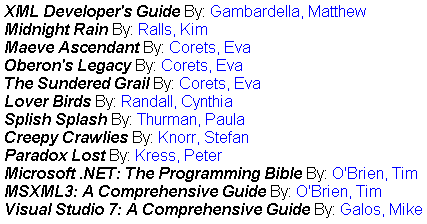
This is the processor output:
<html>
<body>
<font face="Arial"><i><b>XML Developer's Guide</b></i> By: <font color="blue">Gambardella, Matthew</font><br></font>
<font face="Arial"><i><b>Midnight Rain</b></i> By: <font color="blue">Ralls, Kim</font><br></font>
...
<font face="Arial"><i><b>Visual Studio 7: A Comprehensive Guide</b></i> By: <font color="blue">Galos, Mike</font><br></font>
</body>
</html>