Jumps Window
From WriteMonkey
Jumps Window
Home | Categories| Click for details: |
|
|








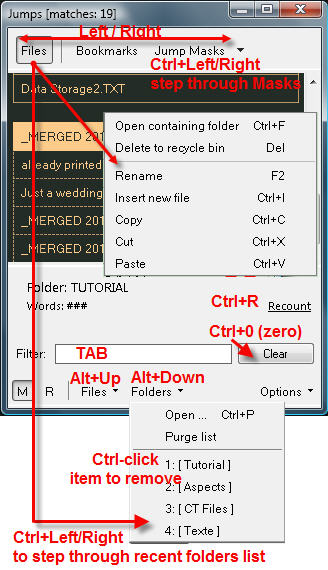
This is your main navigation window for Files + Projects, Bookmarks, Headings, and your own custom Jump Masks
| Open Jumps | CTRL+ENTER or ALT+LEFT/RIGHT |
| middle-click left or right of the text column | |
| click on FileName in the Info Bar | |
| Close Jumps | ESC |
| ENTER (twice in Files view), go to new position | |
| BACKSPACE, keep old position |
Categories: Navigating
Related topics: Files + Projects | Filtering | Tags
WriteMonkey version 2.4.0.6 | This helpfile last updated on Aug 29, 2012 --- Stefan Müller