Jump Masks
From WriteMonkey
Jump Masks
Home | CategoriesIn Jumps Window:
- Press CTRL+LEFT/RIGHT to step through jump masks
- Every mask has it's counterpart definition on the Jumps-tab of Preferences:
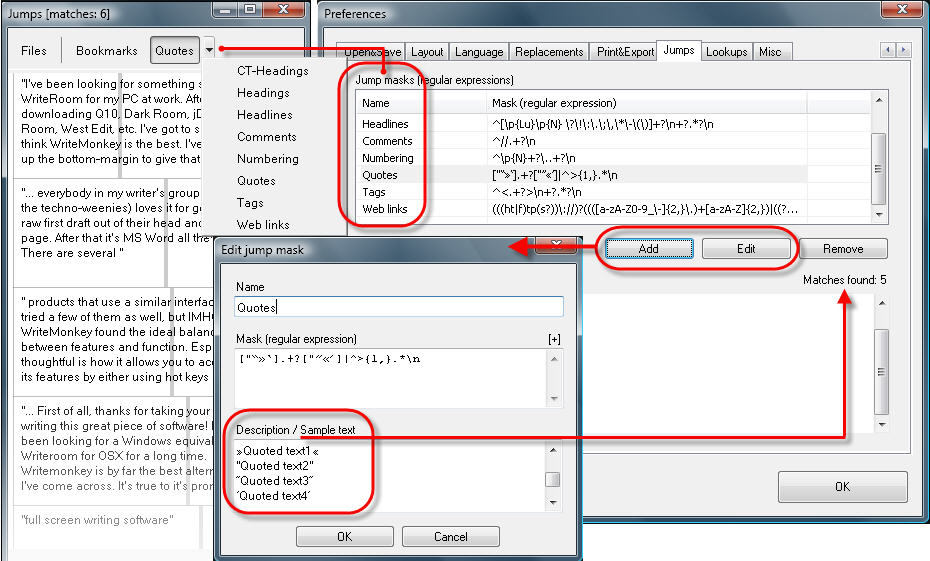
When you add or edit an entry:
- Test your mask by entering a few example terms, "true" and "false" ones
- After clicking OK the 'Matches found' should match your expectations
For a crash course on Regular Expressions, let's take apart 'Quotes':
["“»‘].+?["”«’]|^>{1,}.*\n
["“»‘]  .+? ["”«’] OR ^ >{1,} .* \n
| RegEx in a nutshell | |
| ^ | Beginning of a line |
| \n | new line, line break |
| . (dot) | match any character |
| Referring to what stands left of it: | |
| + | match one or more times |
| * | match zero or more times |
| {n,m} | at least n, but max m times |
| ? | non-greedy mode |
| Groups and Substrings | |
| | | OR operator |
| [xyz] | x or y or z |
["“»‘] any one of these characers
.+? any character, one or more times, non-greedy
["”«’] any one of these characters
| OR
^ beginning of a line
>{1,} the '>' character, at least one time
.* any character, zero or more times, greedy
\n new line
More examples:
Categories: Navigating
WriteMonkey version 2.4.0.6 | This helpfile last updated on Aug 29, 2012 --- Stefan Müller