Info Bar
From WriteMonkey
Info Bar
Home | Categories
ALT+P toggles Infobar Off/On.
The 5 Slots refer to their relative position on screen:
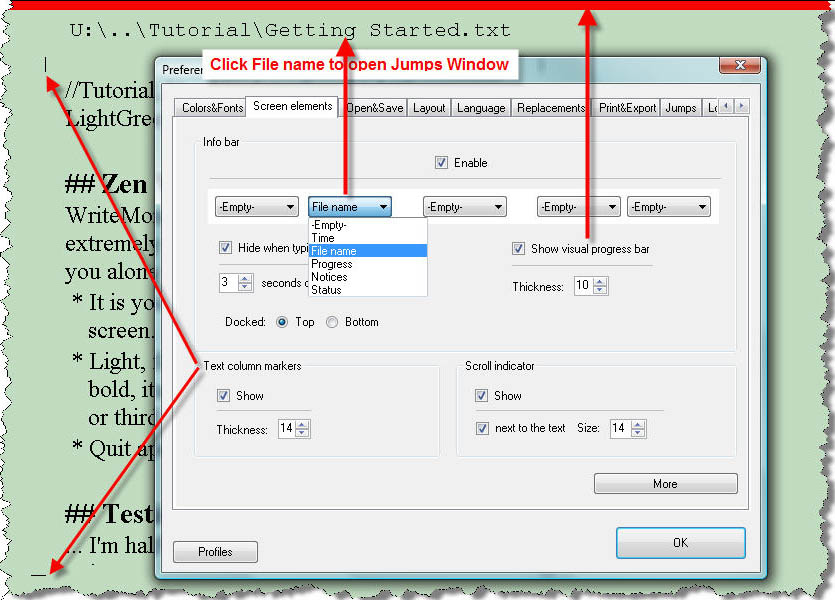
Infobar Sections:
- File Name
 clicking on it will open the Jumps Window
- Progress clicking on it will open the Progress Window for more options
- Notices are shown for a few seconds:
- Repository has contents , Repository on , Saving ... ,
-
Time is up
when sprint writing time has expired
-
Window Opacity:xx%
when dimming opacity with CTRL+F3
- Status:
- Paused Sprint Timer was halted by pressing ALT+F11
- Flw Flow mode, for donors only
- Foc Segment Focus is on
- Rep Repository section is active
- '+' Repository contains text (shown when main section is active)
- '=' Typewriter Scrolling, press CTRL+L to toggle On/Off
- '^' Writemonkey is locked-on-top, press F8 to toggle On/Off
- ±X% when your PC's battery juice drops below the defined %-value, see below
- Paused
- Time click on the 'More'-button to set the format:
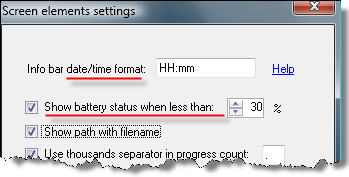
Details about Date/Time-Formatting Date+Time
Related settings:
- Scroll Indicator Scrolling+Zooming
- Visual Progress Bar and Partial Word Count
- Colors+Fonts
- to set the font of the info bar
- to adjust its size for the window mode
Categories: Screen Layout
WriteMonkey version 2.4.0.6 | This helpfile last updated on Aug 29, 2012 --- Stefan Müller