Calling a Course
From Amicus


| Amicus | |
| Calling a Course | |
| See Also Submit feedback on this topic | |
| Modules & Other Devices > Modules > Hospitality Module > Meal Order Table Service > Managing Meal Orders > Modifying an Open Order > Calling a Course |
Glossary Item Box
Courses can be requested when customers are ‘ready’ for a specific course.
To call a course:
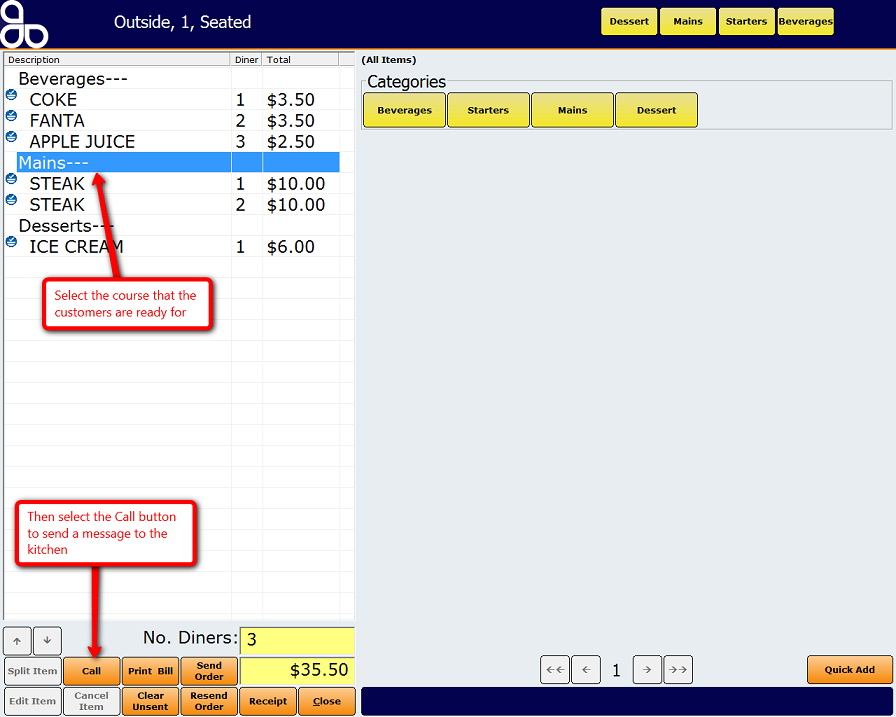
Select the table that the customers are dining at to display the Place an Order screen with the previously added items. Select the requested course (as shown in the figure below) and the Call button should no longer be greyed out. Press on the Call 'course' button to send a message to the configured area informing them that the course is ready to be served.
Below is a figure demonstrating how to call a course.
See Also
Amicus Meal Order Table Service Module User GuideSending an Order
Resending the Order
Adding items to the order