Resending the Order
From Amicus


| Amicus | |
| Resending the Order | |
| See Also Submit feedback on this topic | |
| Modules & Other Devices > Modules > Hospitality Module > Meal Order Table Service > Managing Meal Orders > Modifying an Open Order > Resending the Order |
Glossary Item Box
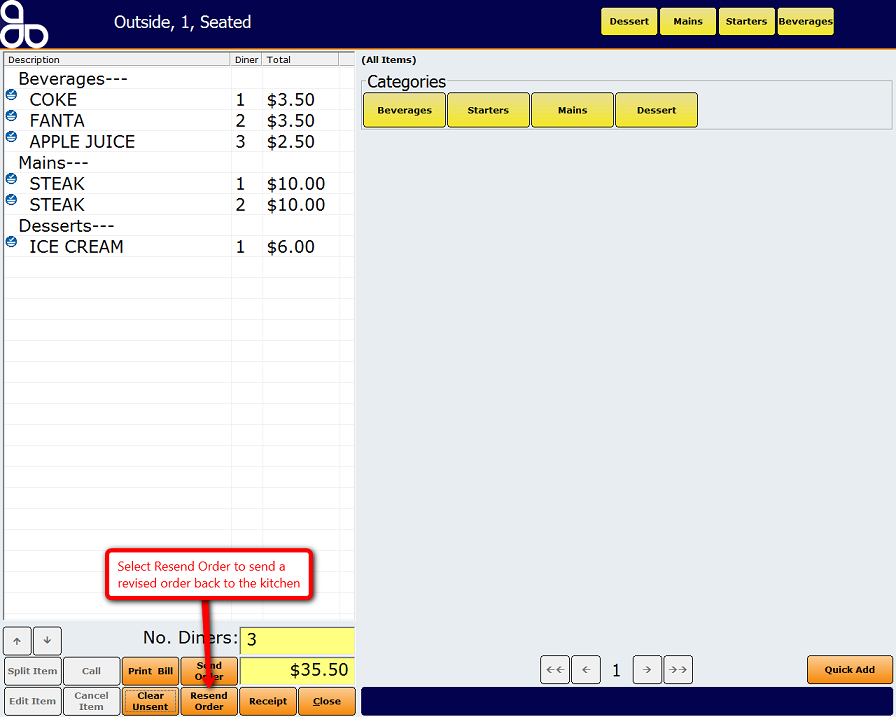
Once an order has been changed it needs to be resent as a revised order. To do this press the Resend Order button that is located on the Meal Order screen. The order will then be re-sent back to the kitchen where it will be updated with the change. The figure below shows where the Resend Order button is located.
See Also
Cancelling Items
Amicus Meal Order Table Service Module User GuideSending an Order
Changing Items