Move Objects Along a Vector
From AutoCAD ActiveX
Move Objects

Move Objects

Rotate Objects

You can move all drawing objects and attribute reference objects along a specified vector.
To move an object, use the Move method provided for that object. This method requires two coordinates as input. These coordinates define a displacement vector indicating how far the given object is to be moved and in what direction.
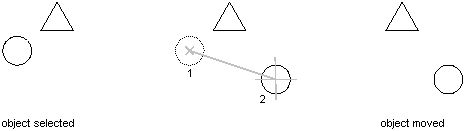
This example creates a circle and then moves that circle two units along the X axis.
Sub Ch4_MoveCircle()
' Create the circle
Dim circleObj As AcadCircle
Dim center(0 To 2) As Double
Dim radius As Double
center(0) = 2#: center(1) = 2#: center(2) = 0#
radius = 0.5
Set circleObj = ThisDrawing.ModelSpace. _
AddCircle(center, radius)
ZoomAll
' Define the points that make up the move vector.' The move vector will move the circle 2 units' along the x axis.Dim point1(0 To 2) As DoubleDim point2(0 To 2) As Doublepoint1(0) = 0: point1(1) = 0: point1(2) = 0point2(0) = 2: point2(1) = 0: point2(2) = 0' Move the circlecircleObj.Move point1, point2circleObj.UpdateEnd Sub