Make an Order or a Quote
From Amicus


| Amicus | |
| Make An Order Or A Quote | |
| See Also Submit feedback on this topic | |
| Key Areas > Customers > Common Tasks > Make An Order Or A Quote |
Glossary Item Box
The sales orders and quotes functions work in a similar fashion to the sales function. When you select the Make an Order or a Quote from the Main Menu, or select Quotes & Orders from the Sales menu on the Toolbar, you will be presented with options for viewing the quotes and orders stored in the system and will also have access to the Allocations tab which will allow you to allocate stock to an order.
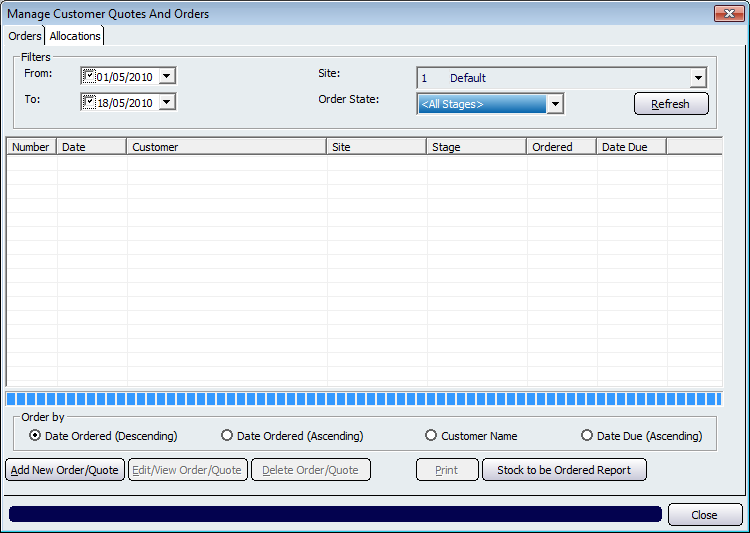
Figure : Viewing order or quotes
Filters
The listing of quotes and orders may be filtered by both Date, Site & Stage, select the From, To, Site and Order State.
The Order Stages you can select from are All Stages, Billing, Completed, Entry, Ordered, Picked, Picking and Quotation.
Table
The table lists all the Quotes & Orders made to customers. columns display; Number, Date, Customer, Site, Stage, Ordered and the Date Due.
Order By
The displayed results in the table can be ordered by Date, Customer Name or the date the order/quote is due.
Record Controls
Buttons to perform actions on the displayed dialogue includes; Add New Order/Quote, Edit/View Order/Quote, Delete Order/Quote, Print, Close.
The Stock to be Ordered Report button opens the Stock to Be Ordered report.
See Also
Amicus Standard User GuideCustomer Order Allocations