wbinterface_gui
From WinBuilder
Graphical Interface
General description
The Interface section contains one ore more single lines describing the components shown in the WinBuilder window. It is driven from the contents of the [Interface] section of the script - UNLESS over-ridden by a setting in the [Main] section of the script.
The format of any individual line follows the basic form of any other INI file:
<name>=<content>
<name> is generated by WinBuilder when using the Interface Editor and contains the component type and an enumeration number. The <name> can be changed by the script author individually using the script editor if desired.
<content> contains one or more fields, separated by commas. The contents and number of fields will depend on the type of component being described. If any field contains a space, it is enclosed in quotes, or may be represented by the appropriate character sequence.
Component Types
There are 15 different types, internally represented by a number between 0 and 14. They are:
- cmpTextBox = 0,
- cmpTextLabel = 1,
- cmpNumberBox = 2,
- cmpCheckBox = 3,
- cmpComboBox = 4,
- cmpImage = 5,
- cmpTextFile = 6,
- cmpEditValues = 7, ( not implemented)1
- cmpButton = 8,
- cmpCheckList = 9,
- cmpWebLabel = 10,
- cmpRadioButton = 11,
- cmpBevel = 12,
- cmpFileBox = 13,
- cmpRadioGroup = 14
1 This capability wasn't implemented due to a lack of perceived value. See this post for more information
Component description
These first 7 fields are common to all implemented components:
- A Text field that contains the following:
- cmpTextBox: Caption
- cmpTextLabel: Caption
- cmpNumberBox: <Component name>
- cmpCheckBox: Caption
- cmpComboBox: <Choice>
- cmpImage: <File name>
- cmpTextFile: <File name>
- cmpButton: Caption
- cmpCheckList: Name of section in scriptfile that contains the list2
- cmpWebLabel: Caption
- cmpRadioButton: Caption
- cmpBevel: <Component name>
- cmpFileBox: <File name> or <Directory name>
- cmpRadioGroup: Caption
- Component Visibility (1=shown, 0=hidden)
- Type of component (see above)
- x-coordinate of component upper left
- y-coordinate of component upper left
- width of the component
- height of the component
Fields 8 and higher (if present) depend on the component type:
- cmpTextBox: <Value Entered in Text Box>
- cmpTextLabel: <Font size>,<Font weight>
- cmpNumberBox: <Specified Value>, <Min>,<Max>,<Increment>
- cmpCheckBox: <True/False>[,<Section to run>]
- cmpComboBox: <Caption 1>, ... ,<Caption n>
- cmpButton: <Section to run>,<Picture>
- cmpWebLabel: <URL>
- cmpRadioButton: <True/False>[,<Section to run>]
- cmpFileBox: The word 'FILE' in the case of file, nothing in case of directory
- cmpRadioGroup: <Caption 1>, ... ,<Caption n>,<Selected index, starting with 0>
2 The cmpCheckList function will display whatever is listed in the particular section up to an "=" sign, which is then followed by a either a 1 or a 0 (checked/unchecked). This status value can be retrieved using the existing "INI" file capability of WinBuilder. See this post for more information and a sample "test" script.
Added in WinBuilder 077 RC 2
Two additional (and optional) fields were added:
- The cmpCheckBox, cmpRadioButton and cmpButton now support an optional parameter that will <Show progress window when running>
- All components now support optional Tooltips. This field starts with a double underscore __ as marker. When added, it will generate a "tool-tip" that will be displayed if the mouse hovers over the object.
Example
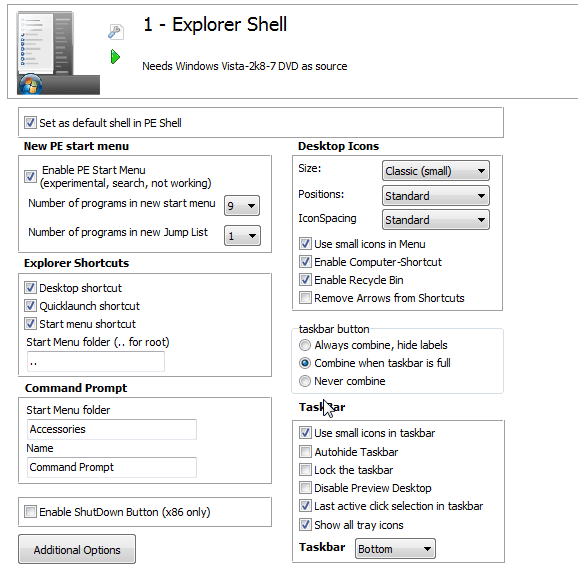
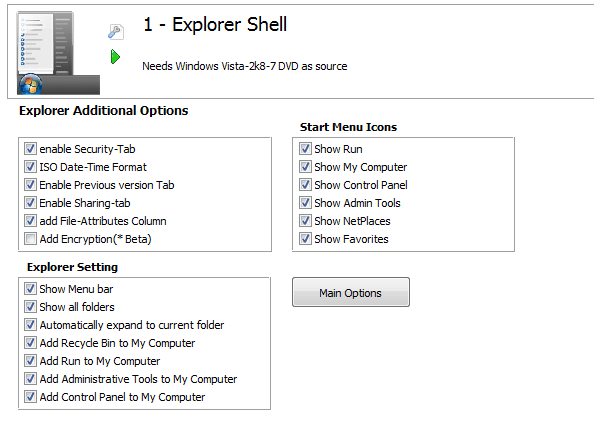
This example code has two pages of interface, and a button that toggles between them (i.e. causes code to be executed)
[Interface]
pCheckBox_PeShell="Set as default shell in PE Shell",1,3,17,11,173,23,True
pBevel1=pBevel1,1,12,10,6,487,32
pTextLabel10="New PE start menu",1,1,17,39,114,18,8,Bold
pCheckBox_StartMenu=" Enable PE Start Menu                 (experimental, search, not working)",1,3,17,60,201,33,True
pTextLabel11="Number of programs in new start menu",1,1,22,96,197,18,8,Normal
pScrollBox11=9,1,4,217,95,36,21,5,6,7,8,9,10
pTextLabel12="Number of programs in new Jump List",1,1,22,125,196,18,8,Normal
pScrollBox12=1,1,4,217,125,37,21,1,2,3,4,5,6,7,8,9,10
pBevel10=pBevel10,1,12,10,54,255,99
pTextLabel20="Desktop Icons",1,1,291,39,90,18,8,Bold
pTextLabel21=Size:,1,1,292,61,36,18,8,Normal
pScrollBox21="Classic (small)",1,4,375,60,108,21,Standard,"Classic (small)","Very small"
pTextLabel22=Positions:,1,1,292,87,58,18,8,Normal
pScrollBox22=Standard,1,4,375,85,108,21,Standard,"Custom (in Source)"
pTextLabel52=IconSpacing,1,1,292,111,79,18,8,Normal
pScrollBox52="Standard",1,4,375,109,108,21,Minimum,Standard,Maximum
pCheckBox21="Use small icons in Menu",1,3,292,135,148,18,True
pCheckBox22="Enable Computer-Shortcut",1,3,292,153,162,18,True
pCheckBox23="Enable Recycle Bin",1,3,292,171,122,18,True
pCheckBox24="Remove Arrows from Shortcuts",1,3,292,189,178,18,False
pBevel20=pBevel20,1,12,284,54,212,157
ptaskbarbutton="taskbar button",1,14,284,222,213,73,"Always combine, hide labels","Combine when taskbar is full","Never combine",1
pTextLabel_SC="Explorer Shortcuts",1,1,17,156,125,20,8,Bold
pCheckBox_DT="Desktop shortcut",1,3,17,179,155,18,True
pCheckBox_QL="Quicklaunch shortcut",1,3,17,197,122,18,True
pCheckBox_SM="Start menu shortcut",1,3,17,215,122,18,True
pTextBox_SMF="Start Menu folder (.. for root)",1,0,20,251,138,21,..
pBevel30=pBevel30,1,12,10,172,255,105
pTextLabel50=TaskBar,1,1,292,300,59,18,8,Bold
pCheckBox51="Use small icons in taskbar",1,3,292,324,142,18,True
pCheckBox52="Autohide Taskbar",1,3,292,343,115,18,False
pCheckBox53="Lock the taskbar",1,3,292,361,109,18,False
pCheckBox54="Disable Preview Desktop",1,3,292,379,154,18,False
pCheckBox55="Last active click selection in taskbar",1,3,292,397,194,18,True
pCheckBox56="Show all tray icons",1,3,292,416,120,18,True
pTextLabel51=Taskbar,1,1,292,440,47,18,8,Bold
pScrollBox51=Bottom,1,4,348,438,81,21,Bottom,Left,Right,Top
pBevel50=pBevel50,1,12,284,319,214,144
pTextLabel40="Command Prompt",1,1,18,281,125,18,8,Bold
pTextBox41="Start Menu folder",1,0,20,319,170,21,Accessories
pTextBox42=Name,1,0,20,357,170,21,"Command Prompt"
pBevel40=pBevel40,1,12,10,296,255,88
Shutdown_Box="Enable ShutDown Button (x86 only)",1,3,17,403,210,18,False,Select_Shutdown_Box,True,_Select_Shutdown_Box_,True
pBevel60=pBevel60,1,12,10,396,255,31
pButton1="Additional Options",1,8,10,433,120,32,AdditionalOptions,0,True,_AdditionalOptions_,True
//

[Interface-Additional]
pTextLabel100="Explorer Additional Options ",1,1,12,3,182,20,9,Bold
pCheckBox101="enable Security-Tab",1,3,17,40,170,18,True
pCheckBox102="ISO Date-Time Format",1,3,17,58,170,18,True
pCheckBox103="Enable Previous version Tab ",1,3,17,76,170,18,True
pCheckBox104="Enable Sharing-tab",1,3,17,94,170,18,True
pCheckBox105="add File-Attributes Column",1,3,17,112,170,18,True
pCheckBox106="Add Encryption(* Beta)",1,3,17,130,153,18,False
pBevel100=pBevel100,1,12,10,36,255,116
pTextLabel110="Explorer Setting",1,1,20,160,105,18,8,Bold
pCheckBox110="Show Menu bar",1,3,17,180,104,18,True
pCheckBox111="Show all folders",1,3,17,198,104,18,True
pCheckBox112="Automatically expand to current folder",1,3,17,216,222,18,True
pCheckBox113="Add Recycle Bin to My Computer",1,3,17,234,200,18,True
pCheckBox114="Add Run to My Computer",1,3,17,252,159,17,True
pCheckBox115="Add Administrative Tools to My Computer",1,3,17,270,235,18,True
pCheckBox116="Add Control Panel to My Computer",1,3,17,288,200,18,True
pBevel110=pBevel110,1,12,10,176,254,134
pTextLabel120="Start Menu Icons",1,1,293,20,101,18,8,Bold
pCheckBox120="Show Run",1,3,292,40,77,18,True
pCheckBox121="Show My Computer",1,3,292,58,117,18,True
pCheckBox122="Show Control Panel",1,3,292,76,119,18,True
pCheckBox123="Show Admin Tools",1,3,292,94,114,18,True
pCheckBox124="Show NetPlaces",1,3,292,112,99,18,True
pCheckBox125="Show Favorites",1,3,292,130,98,18,True
pBevel20=pBevel120,1,12,284,36,224,116
pButton2="Main Options",1,8,284,176,120,32,MainOptions,0,True,_MainOptions_,True
//

[AdditionalOptions]
//Write or update an entry in the [main] section to set a new interface
IniWrite,%ScriptFile%,Main,Interface,Interface-Additional
System,REFRESHINTERFACE

[MainOptions]
IniWrite,%ScriptFile%,Main,Interface,Interface
System,REFRESHINTERFACE
This would result in the following two pages being displayed by WinBuilder
Known issues
If you change a script containing WB 077 features with WinBuilder 076 or lower, the features are lost!