Search Products
From Amicus


| Amicus | |
| Search Products | |
| See Also Submit feedback on this topic | |
| Key Areas > Stock Control And Products > Search > Search Products |
Glossary Item Box
To access the Search Products window (shown below), click the Stock Control option in the Administration section of the Main Menu, and then click the Search Products option on the menu that subsequently appears. This function allows you to quickly search any of the fields within the Product database.
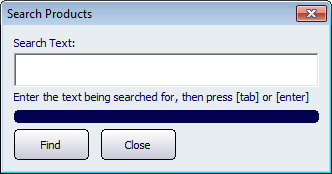
Figure : The Search Products function
To use this function, type the information that you wish to look-up, such as a products Description, Product Code or Barcode, and then click Find to search the Product database.
If NBS Amicus can find any information that matches the information you entered, NBS Amicus will either open the Add / Edit Products screen showing the exact match for your search, or the Select Product screen if there is more than one match to your search. Note: If you leave the Search Text field blank and click on the Find button the Select Product screen will appear with a list of all of the products within your product database.
Another screen that will list all of the products that exist in your product database is the Product Listing Page.