Change Price
From Amicus


| Amicus | |
| Change Price | |
| See Also Submit feedback on this topic | |
| Modules & Other Devices > Modules > Hospitality Module > Meal Order Table Service > Managing Meal Orders > Create an Order > Change Price |
Glossary Item Box
To change the price of an item, select Change Price. The dialogue will appear prompting you to enter the new price for the product.
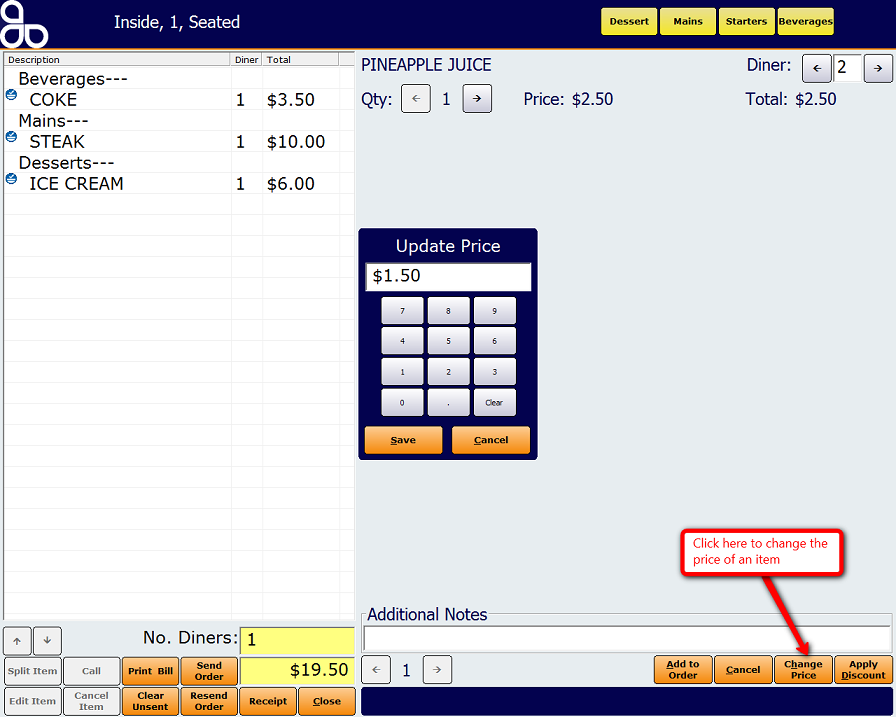
Clicking on the Change Price button will open up the Update Price dialogue. Enter in the updated price of the item and then click on the Save button. This will then add the item to the order with the updated price.
See Also
Amicus Meal Order Table Service Module User GuideApply Discount to Items