Bulk Price Changes
From Amicus


| Amicus | |
| Bulk Price Changes | |
| See Also Submit feedback on this topic | |
| Key Areas > Stock Control And Products > Pricing > Bulk Price Changes |
Glossary Item Box
The Bulk Price Change tool is an application that allows you to change the sale price of individual items and also groups of products. This screen allows you to more easily control the pricing of the products your business sells.
This tool also allows the creation of promotional pricing on a large scale. For example, you may have several products that will be on a promotion for a certain amount of days. The Bulk Change tool will allow you to select those products and set their promotional price and the date range when the promotion is on. e.g. all soft drinks will be $2.99 from June 16 till June 30. See the Promo Pricing page for more information regarding promotional pricing.
To access the Bulk Change dialogue, select Products from the Amicus Toolbar, then click on Pricing then Bulk Change. Doing this will open up the following screen
You will be greeted with a form to filter products by Department, Sub-Department, Product Group, Supplier, Manufacturer, Location and Product Code Range.
Select the filters as required and click the Load button to open the Price Summary Dialogue.
Refer to the Price Summary page for details on how to use the Price Summary screen.
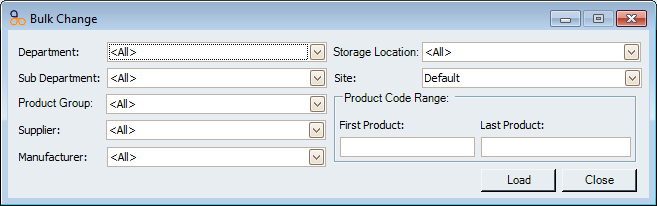
Figure : Default settings allow selection of all products
See Also
Amicus Administration User GuidePromo Pricing
Bulk Price Change
Price Summary
Template Database
Product Templates