Markup Formatting
From WriteMonkey
Markup Formatting
Home | Categories
Markup is a generic term for a language that describes a document's formatting, such as HTML
Markdown is a specific markup library.
Formatting is not the domain of a plain text editor. However, WriteMonkey allows you to 'mark up' your text for formatted output according to syntax rules.
- Press F1 to call up the Help Cards, the second page contains markup rules
- The syntax explained corresponds to your chosen settings on the Print&Export Tab:
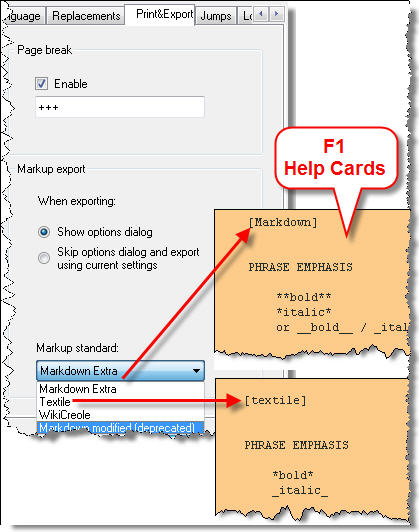
When using keystrokes CTRL+B and CTRL+I for bold and italics, WriteMokey will apply the correct markup-syntax, depending on your chosen markup standard.
Other markups must be entered in their correct syntax:
| Element | Markdown | Textile |
|
Code-span |
`code-span` |
@code-span@ |
|
blockquote |
> indented
|
bq. indented |
|
## Heading two
|
h2. Heading two
|
Syntax documentations:
- Markdown Extra: daringfireball.net/projects/markdown/syntax

- WikiCreole: wikicreole.org/wiki/CheatSheet
- Textile: en.wikipedia.org/wiki/Textile_%28markup_language%29
Save your markdown files with the .md extension in the Save as ... dialog (file type dropdown) if you want to tell them apart from your other text files
CTRL+SHIFT+H will copy selected markup-text as HTML:
- if you select this: ## Heading Level 2
- then copy it with CTRL+SHIFT+H
- pasting it will result in <h2>Heading Level 2</h2>
CTRL+SHIFT+F will copy selected markup as rendered HTML, see Markup Export
Syntax Highlighting
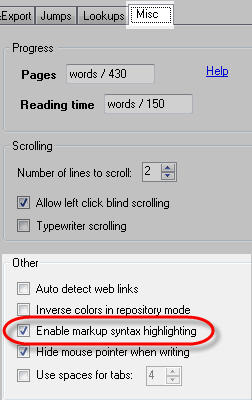 |
 |
- This has nothing to do with printing styles or RTF.
- "Real formatting" will only occur upon Markup Export
Examples of Syntax Highlighting:
- Paragraphs marked as indented block quote (">" for Markdown and "bq." for Textile) will be indented by 60 pixels.
- Paragraphs marked as list items (- * + 1.) will be indented properly.
- In order for this to work, there must be exactly one space between list mark and first letter of the text.
- Nest items by starting the paragraph with tabs or spaces (Markdown style), or use multiple marks (##, ** - Textile and WikiCreole).
- Headings can be screen-formatted in various ways: see Styling Headings
Categories: Screen Layout | What else?
Related topics: Markup Export
WriteMonkey version 2.4.0.6 | This helpfile last updated on Aug 29, 2012 --- Stefan Müller