Writing WiX Tests
From Windows Installer XML (WiX) v3.0
Writing WiX Tests
This document describes how to write tests for WiX.
Location of the Tests
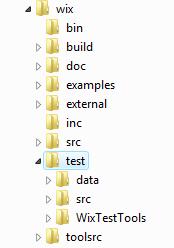
The root directory for the tests is %WIX_ROOT%\test. There are three main subdirectories:
- data: contains test data, eg wxs files
- src: contains source code for the tests
- WixTestTools: contains source code for the WixTestTools library
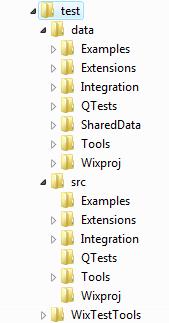
The data and src directories are further organized by feature area:
- Examples: Example tests
- Extensions: Tests for WiX extensions
- Integration: Tests for integration of two or more tools. Eg. Building an MSI from source with Candle and Light.
- QTests: Tests migrated from the previous test infrastructure
- SharedData: Test data that is shared across multiple tests
- Tools: Tests for a particular tool's command line options
- Wixproj: Tests for building .wixproj's with MSBuild
WixTests Solution
The test solution file, WixTests.sln, is located in %WIX_ROOT%\test\WixTests.sln. The WixTests solution currently contains two projects:
- WixTests: Contains all of the tests
- WixTestsTools: A library of wrapper classes and verification methods used by the tests
The solution should be opened from the WiX command window to ensure that the %WIX_ROOT% environment variable is set.
Example Tests
Example: Build and Verify an MSI
The following example shows how to test building an MSI from WiX source.
[TestMethod]
[Description("An example test that verifies an MSI is built correctly")]
[Priority(3)]
public void ExampleTest1()
{
// Use the BuildPackage method to build an MSI from source
string actualMSI = Builder.BuildPackage(@"%WIX_ROOT%\test\data\SharedData\Authoring\BasicProduct.wxs");
// The expected MSI to compare against
string expectedMSI = @"%WIX_ROOT%\test\data\SharedData\Baselines\MSIs\BasicProduct.msi";
// Use the VerifyResults method to compare the actual and expected MSIs
Verifier.VerifyResults(expectedMSI, actualMSI);
}
Example: Check for a Warning and Query an MSI
The following example shows how to build an MSI using the Candle and Light wrapper classes. It also demonstrates how to check for a warning from Light and query the resuling MSI.
[TestMethod]
[Description("An example test that checks for a Light warning and queries the resulting MSI")]
[Priority(3)]
public void ExampleTest2()
{
// Compile a wxs file
Candle candle = new Candle();
candle.SourceFiles.Add(@"%WIX_ROOT%\test\data\Examples\ExampleTest2\product.wxs");
candle.Run();
// Create a Light object that uses some properties of the Candle object
Light light = new Light(candle);
// Define the Light warning that we expect to see
WixMessage LGHT1079 = new WixMessage(1079, WixMessage.MessageTypeEnum.Warning);
light.ExpectedWixMessages.Add(LGHT1079);
// Link
light.Run();
// Query the resulting MSI for verification
string query = "SELECT `Value` FROM `Property` WHERE `Property` = 'Manufacturer'";
Verifier.VerifyQuery(light.OutputFile, query, "Microsoft Corporation");
}
Example: ICE Validation with Smoke
The following example shows how to verify that Smoke catches a particular ICE violation and how to use the Result object to perform further verification.
[TestMethod]
[Description("An example test that verifies an ICE violation is caught by smoke")]
[Priority(3)]
public void ExampleTest3()
{
string testDirectory = Environment.ExpandEnvironmentVariables(@"%WIX_ROOT%\test\data\Examples\ExampleTest3");
// Build the MSI that will be run against Smoke. Pass the -sval argument to delay validation until Smoke is run
string msi = Builder.BuildPackage(testDirectory, "product.wxs", "product.msi", null, "-sval");
// Create a new Smoke object
Smoke smoke = new Smoke();
smoke.DatabaseFiles.Add(msi);
smoke.CubFiles.Add(@"%WIX_ROOT%\test\data\Examples\ExampleTest3\test.cub");
// Define the expected ICE error
WixMessage LGHT1076 = new WixMessage(1076, "ICE1000: Component 'ExtraICE.0.ProductComponent' installs into directory 'TARGETDIR', which will get installed into the volume with the most free space unless explicitly set.", WixMessage.MessageTypeEnum.Warning);
smoke.ExpectedWixMessages.Add(LGHT1076);
// Run Smoke and keep a reference to the Result object that is returned by the Run() method
Result result = smoke.Run();
// Use the Result object to verify the exit code
// Note: checking for an exit code of 0 is done implicitly in the Run() method but
// this is just for demonstration purposes.
Assert.AreEqual(0, result.ExitCode, "Actual exit code did not match expected exit code");
}