ROUTe:MONitor
ROUTe:MONitor
Syntax
ROUTe:MONitor (@<channel>)
ROUTe:MONitor?
Description
This command/query selects the channel to be displayed on the front panel. Only one channel can be monitored at a time.
Parameters
Name Type Range of Values Default Value <channel> Channel A single channel, specified as in the following examples.
(@310) - channel 10 on the module in slot 300.
(@214) - channel14 on the module in slot 200.
This is a required parameter.
Remarks
- Channels must be configured for a measurement in order to be monitored (see CONFigure and SENSe commands). Configuring a channel for a measurement makes it monitorable and makes it part of the scan list.
- A scan always has priority over the Monitor function (see ROUTe:SCAN command).
- Any channel that can be "read" by the instrument can be monitored. This includes any combination of temperature, voltage, resistance, current, frequency, or period measurements on multiplexer channels. You can also monitor a digital input channel or the totalizer count on the digital modules.
- Mx+B scaling and alarm limits are applied to the selected channel during a Monitor and all alarm data is stored in the alarm queue (which will be cleared if power fails).
- For monitor operations using a multiplexer module, no measurements are taken if the internal DMM is disabled (see INSTrument:DMM command) or not installed in the mainframe. The internal DMM is not required for monitor operations on the digital modules.
- For 4-wire resistance measurements, the instrument automatically pairs channel n in Bank 1 with channel n+10 (34901A) or n+8 (34902A) to provide the source and sense connections.
- The count on a totalizer channel is not reset when it is being monitored (the Monitor ignores the totalizer reset mode).
Return Format
The query returns the Monitor channel in Definite-Length Block format. The syntax is a pound sign (#) followed by a non-zero digit representing the number of characters to follow. This digit is followed by a decimal integer indicating the number of data bytes to follow. This is followed by a block of data containing the specified number of bytes. The query always returns the channel currently displayed on the front panel.
For example:
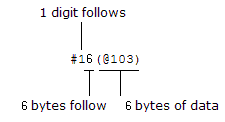
Examples
The following program segment configures channel 3 in slot 100 for DC voltage measurements, enables monitoring on the channel, and turns on the Monitor mode.
CONF:VOLT:DC (@103)
ROUT:MON:CHAN (@103)
ROUT:MON:STAT ON
The following command queries the channel currently selected as the Monitor channel.
ROUT:MON:CHAN?
Typical Response: #16(@103)