ROUTe:SCAN
ROUTe:SCAN
Syntax
ROUTe:SCAN (@<scan_list>)
ROUTe:SCAN?
Description
This command selects the channels to be included in the scan list. This command is used in conjunction with the CONFigure commands to set up an automated scan. The specified channels supersede any channels previously defined to be part of the scan list. To start the scan, use the INITiate or READ? command.
Used With:
- 34901A 20 Channel Multiplexer (2/4-wire) Module
- 34902A 16 Channel Multiplexer (2/4-wire) Module
- 34907A Multifunction Module (digital input and totalizer)
- 34908A 40 Channel Single-Ended Multiplexer Module

|
To remove all channels from the present scan list, send "ROUT:SCAN (@)". |
Parameters
Name Type Range of Values Default Value <scan_list> Scan List One or more channels, as shown:
(@310) - channel 10 on the module in slot 300.
(@305:310) - channels 05 through 10 on the module in slot 300.
(@202:207,209,302:308) - channels 02 through 07 and 09 on the module in slot 200 and channels 02 through 08 on the module in slot 300.
This is a required parameter.
Remarks
- To remove all channels from the scan list, issue the command ROUT:SCAN (@).
- The instrument scans the list of channels in ascending order from slot 100 through slot 300 (channels are re-ordered as needed).When you specify a range of channels in the <scan_list>, the channels are always sorted in ascending order. Therefore, (@109:101) will always be interpreted as 101, 102, 103, etc.
- You can use either the internal DMM or an external instrument to make measurements of your configured channels. However, the 34970A/34972A allows only one scan list at a time; you cannot scan some channels using the internal DMM and others using an external instrument. Readings are stored in 34970A/34972A memory only when the internal DMM is used, except for digital input and totalizer channels.
- You can store at least 50,000 readings in memory and all readings are automatically time stamped. If memory overflows, the new readings will overwrite the first (oldest) readings stored; the most recent readings are always preserved. You can read the contents of memory at any time, even during a scan. Reading memory is not cleared when you read it.
- Each time you start a new scan, the instrument clears all readings (including alarm data) stored in reading memory from the previous measurement. Therefore, the contents of memory are always from the most recent measurement.
- If you abort a scan that is running (see ABORt command), the instrument will terminate any reading in progress (readings are not cleared from memory). If a scan is in progress when the command is received, the scan will not be completed and you cannot resume the scan from where it left off. Note that if you initiate a new scan, all readings are cleared from memory.
- The CONFigure and MEASure? commands overwrite the scan list.
- The present scan list is stored in non-volatile memory and will be retained when power is turned off.
Return Format
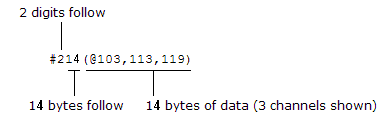
The query returns a list of channel numbers in Definite-Length Block format. The syntax is a pound sign (#) followed by a non-zero digit representing the number of characters to follow. This digit is followed by a decimal integer indicating the number of data bytes to follow. This is followed by a block of data containing the specified number of bytes. An empty scan list (one with no channels selected) will indicated by "#13(@)"
For example:
Examples
The following program segment shows how to use the CONFigure command to configure two channels for DC voltage measurements. The ROUTe:SCAN command puts the two channels into the scan list (and redefines the scan list). The INITiate command places the instrument in the "wait-for-trigger" state and then sends the readings to memory. The FETCh? command transfers the readings from memory to the instrument's output buffer.
CONF:VOLT:DC 10,0.003,(@103,108)
ROUT:SCAN (@103,108)
INIT
FETC?
Typical Response: +4.27150000E-03,+1.32130000E-03
The following command clears the present scan list.
ROUT:SCAN (@)
The following query returns a list of channels in the present scan list.
ROUT:SCAN?
Typical Response: #210(@103,108)
See Also