OUTPut:ALARm{1|2|3|4}:SOURce
OUTPut:ALARm{1|2|3|4}:SOURce
Syntax
OUTPut:ALARm{1|2|3|4}:SOURce (@<ch_list>)
OUTPut:ALARm{1|2|3|4}:SOURce?
Description
This command assigns one of four alarm numbers to report any alarm conditions on the specified multiplexer or digital channels.
On the digital modules, you can configure the instrument to generate an alarm when a specific bit pattern or bit pattern change is detected on a digital input channel or when a specific count is reached on a totalizer channel. These channels do not have to be part of the active scan list to generate an alarm.
Used With:
- 34901A 20 Channel Multiplexer (2/4-wire) Module
- 34902A 16 Channel Multiplexer (2/4-wire) Module
- 34907A Multifunction Module (digital input only)
- 34908A 40 Channel Single-Ended Multiplexer Module
Parameters
Name Type Range of Values Default Value <ch_list> Channel List One or more channels, as shown:
(@310) - channel 10 on the module in slot 300.
(@305:310) - channels 05 through 10 on the module in slot 300.
(@202:207,209,302:308) - channels 02 through 07 and 09 on the module in slot 200 and channels 02 through 08 on the module in slot 300.
This is a required parameter.
Remarks
- You can assign multiple channels to any of the four available alarms (numbered 1 through 4, see OUTPut:ALARm<n>:SOURce command). For example, you can configure the instrument to generate an alarm on the Alarm 1 output when a limit is exceeded on any of channels 103, 205, or 310. You cannot, however, assign alarms on a specific channel to more than one alarm number.
- A Factory Reset (*RST command) clears all alarm limits and turns off all alarms. An Instrument Preset (SYSTem:PRESet command) or Card Reset (SYSTem:CPON command) does not clear the alarm limits and does not turn off alarms.
Return Format
The query returns a series of channel numbers in Definite-Length Block format. The syntax is a pound sign (#) followed by a non-zero digit representing the number of digits in the decimal integer to follow. This digit is followed by a decimal integer indicating the number of 8-bit data bytes to follow. This is followed by a block of data containing the specified number of bytes.
For example: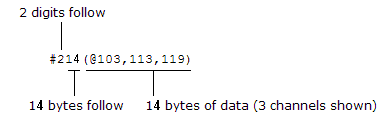
An empty scan list (one with no channels selected) will return "#13(@)".
Examples
The following command assigns Alarm 2 to report any alarm conditions on channels 03 and 13 in slot 100.
OUTP:ALAR2:SOUR (@103,113)
The following query returns the channels assigned to Alarm 2.
OUTP:ALAR2:SOUR?
Typical Response: #210(@103,113)