Finalising a Sale Using a Touch Screen - Invoice
From Amicus


| Amicus | |
| Finalising a Sale Using a Touch Screen - Invoice | |
| See Also Submit feedback on this topic | |
| Transactions > Finalising a Sale Invoice Screen > Finalising a Sale Using a Touch Screen - Invoice |
Glossary Item Box
The following screen appears when finalising a sale using a touch screen:
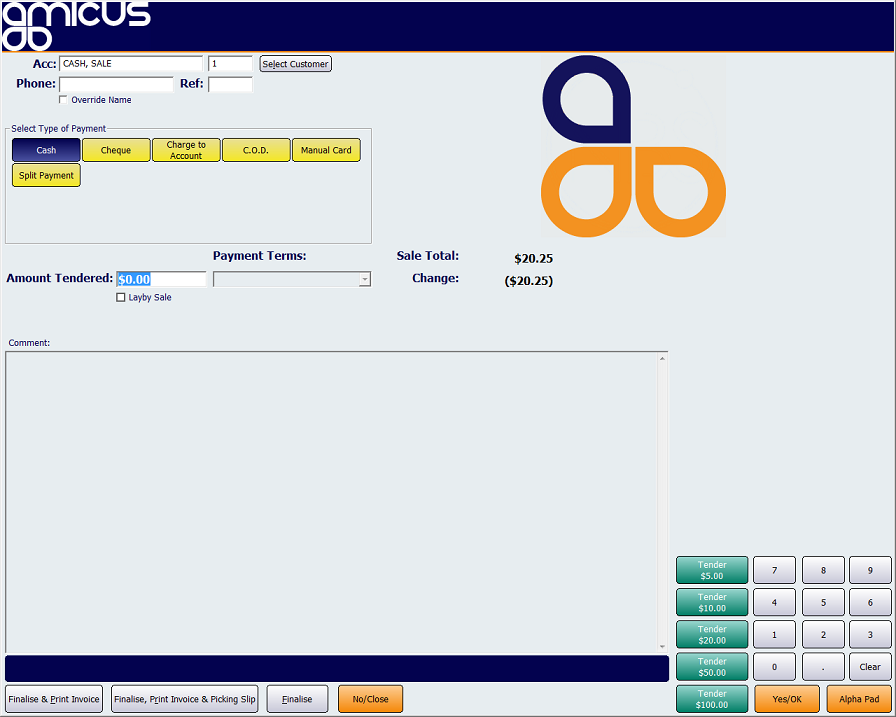
Figure : Finalising a sale using a touch screen
Even though touch buttons are being used here, the processing carried out by NBS Amicus is identical to the processing that occurs when the touch screen option is not activated. For detailed information about that processing, refer to Finalising a Sale.
Note regarding denomination hot keys.
When a cash sale is being processed, a selection of denomination hot keys for all note values - Tender $100.00, Tender $50.00, Tender $20.00, Tender $10.00 and Tender $5.00 will be automatically displayed and enabled. The purpose of these denomination hot keys is to make the sale process more efficient and to reduce keystroke error when inputting amounts tendered.
The denomination hot keys can only be used when a single note is tendered. In instances where a tendered amount is comprised of several notes, the amount must be keyed in.
The selection of a denomination hot key will replace manual input. However those staff wishing to manually key in amounts may continue to do so.