Running a Report with Parameters
From Alchemex 7.1
Home >
Running a Report with Parameters
To run your report with Parameters,
click on the Run Icon  which will activate your report. The parameter prompt window will automatically
be displayed.
which will activate your report. The parameter prompt window will automatically
be displayed.
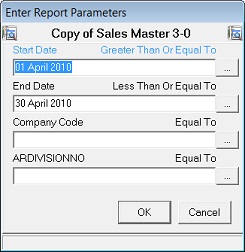
You may now either:
Enter your selection in the field provided or
Use the lookup
 (where available) to search for a selection, and click on OK.
Note: The Lookup facility will only be available if it has been enabled by the System Administrator for this expression. See Add Data Expressions.
Also refer to Defining Parameter Lookups for more information on the lookup facility.
Once your data has been retrieved, Sage Intelligence Reporting will automatically open a Microsoft Excel workbook to display your data.