Report History
From Alchemex 7.1
Home >
Report History
Note: History Logging is turned off by default. Should you wish to store report history then you can turn this feature on by setting History Logging to 1 in the configuration file found in the default installation folder.
The Report History window lets a user view the details of previous report runs. A report that has been run is referred to as an Instance. By selecting an Instance from within the Report History window details of the instance can be viewed through its properties.
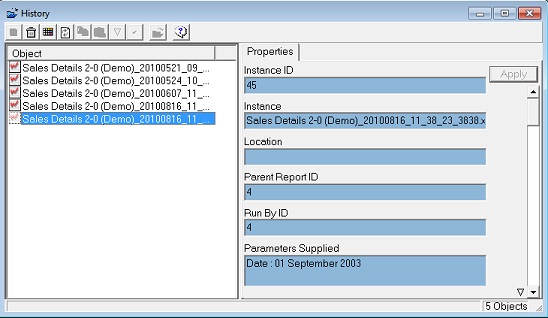
A definition of the report history properties can be found below.
| Property | Definition |
|---|---|
| Instance ID | Technical Key Identifier for the Instance |
| Instance | The name of the Instance. This is the name of the report with a date-time stamp in the format: [REPORT NAME]_YYYYMMDD_HH_MM_SS_NNNN.xls |
| Location | The file path of the instance if it was retained (Retaining Instances is an advanced Report setting) |
| Parent Report ID | The Technical Key Identifier of the Instances Parent Report |
| Run by ID | Not Currently Supported |
| Parameters Supplied | The Parameters supplied to the report at Run Time |
| Run on Server | The Workstation on which the Report was initiated |
| Launch Time (@Server) | The time at which the Report was initiated |
| Completion Time (@Server) | The time at which the Report completed/failed |
| Process Exit Code | The Technical Exit Process Code of the Report Run Process |
| Process Error | Errors raised by the Report Run |
| Process Time (seconds) | The amount of time in seconds for the Run to complete |