Data Connection
From Alchemex 7.1
Home > Connector > Data Connections > Data Connection
Data Connection
A Data Connection holds the relevant connection information to connect to a supported ODBC or OLEDB compliant Data Source. This Data Connection object is then used for all connections to this Data Source. By adding a Data Connection the System Administrator can make data available from this Data Source.
To display the properties of your Data Connection, select a Data Connection
and on the Toolbar, click the Properties button  .
.
The Data Connection Properties window will appear.
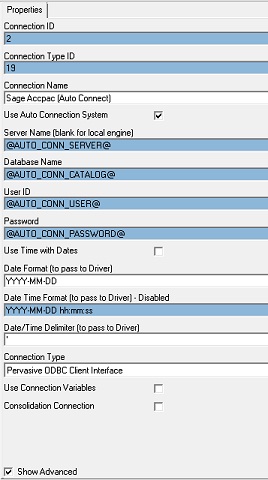
To Hide/Unhide advanced properties check/uncheck the Show Advanced option
 .
.
| Property | Description |
|---|---|
| Connection ID | A Technical Key Value used to identify the Data Connection. |
| Connection Type ID | Value used to associate the Data Connection with a Connection Type |
| Use Auto Connection System | The Auto Connection System is a system used to automate a connection to a data source at report execution time. This system allows the database connection properties for reports to be set at execution time and not to be hard wired into the Connection in the Connector. See Auto Connection System for further details. |
| Connection Name | The name assigned by the Administrator for the Data Connection |
| User ID | The user ID that will be used to gain a connection to the underlying Data Source. |
| Password | The Password that will be used to gain a connection to the underlying Data Source |
| Use Time with Dates | Forces the full Date and Time values to be passed to the underlying database system. If this option is not selected the Date Format (to pass to Driver) will be enabled and the format specified will be used, otherwise the Date Time Format (to pass to Driver) will be enabled and the format specified will used. See Connection Date Time Formats for further information. |
| Date Format (to pass to Driver) | The Date format that the underlying Database System expects Dates to be presented in. This is the format that Sage Intelligence Reporting will convert dates to, before passing them to the underlying system. This needs to be correctly configured in order for Filters and Parameters to work correctly with dates in the Report Manager Interface. It is not the Date that a user of the Report Manager has to use. For a full list of the expected Date Formats for supported Connection Types please check Connection Date Formats for further information. This is only available when Use Time with Dates is not selected. |
| Date Time Format (to pass to Driver) | The Date Time format that the underlying Database System expects Dates/ Times to be presented in. This is the format that Sage Intelligence Reporting will convert dates to before passing them to the underlying system. This needs to be correctly configured in order for Filters and Parameters to work correctly with dates in the Report Manager Interface. It is not the Date that a user of the Report Manager has to use. This is only available when Use Time with Dates is selected. See Connection Date Time Formats for further information. |
| Date/Time Delimiter | This is the Date Delimiter that the Connection expects dates to be prefixed and suffixed with. This needs to be correctly configured in order for Filters and Parameters to work correctly with dates in the Report Manager Interface. Most systems use a single quotation mark (') for this while some use a hash (#) symbol. |
| Connection Type | Sets the type of the Data Connection |