Auto Connection System
From Alchemex 7.1
Home > Connector > Data Connections > Auto Connection System
Using the Auto Connection System
In order for Sage Intelligence Reporting to communicate via ODBC to any database, these values need to be resolved:
- Server Name
- Database Name
- User ID
- Password
The Auto Connection System in Sage Intelligence Reporting is used to automate a Connection between a data server and data source at report execution time.
The Auto Connection System takes care of the above values by passing all these critical values during the company log on process to Sage Intelligence Reporting. Especially if more than one server (Database Host) and database exists on the network, this feature proves very helpful to automate seamless integration to automatically use the relevant logged in server and company.
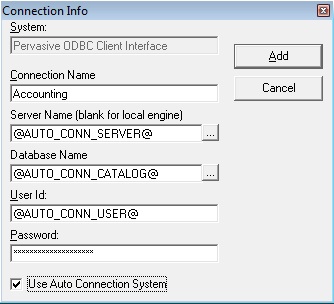
Notice the following four field variables values of the Connection Properties:
Server: @AUTO_CONN_SERVER@
The @ signs indicates that upon report runtime some variable value is expected to be supplied. In the case of the above string it’s the appropriate MySQL Server name to access the data.
Therefore the relevant MySQL server PC’s name will be automatically supplied by the Auto Connection System.
Database Name: @AUTO_CONN_CATALOG@
The above string indicates the expected value to be supplied by the Auto Connection System upon report runtime of any report is the relevant Database Folder.
Therefore the specific currently opened company’s equivalent Database Folder will be supplied by the Auto Connection System.
User ID: @AUTO_CONN_USER@
This string indicates that the MySQL server’s User ID field that is logged into Sage Intelligence Reporting would be automatically supplied by the Auto Connection System.
Password: @AUTO_CONN_PASSWORD@
This string indicates the MySQL’s password that Sage Intelligence Reporting is using that would be automatically supplied by the Auto Connection System upon report runtime.
Automatic Query and Response Dynamics
All Sage Intelligence Reporting reports that are run, are passed through the Auto Connection Properties (automatic query prompt running in the background) for the 4 mentioned variables to be specified first before data can be extracted from the database.
In response the relevant 4 variables values are supplied in accordance with the specific company opened and the relevant MySQL Server PC name.