Data Container
From Alchemex 7.1
Home > Connector > Data Containers > Data Container
Data Container
A Data Container is simply a set of data which is made available (published) by the Connector which will allow users access to the data using the Report Manager interface. The source of this data can be either a Database Table, View, Stored Procedure or a custom Join based on two or more Tables/Views.
To display the properties of your Data
Container, select a Data Container and on the Toolbar click the Properties
button  .
.
The Data Container properties window will appear.
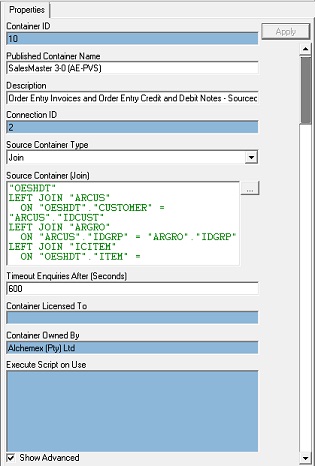
| Property | Description |
|---|---|
| Container ID | A Technical Key Value used to identify the Data Container |
| Published Container Name | The name assigned by the System Administrator for the Data Container |
| Description | A description for the Data Container |
| Connection ID | A Technical Key Field for the Data Connection to which the Data Container is assigned |
| Source Container | The name of the underlying Source Data Structure (TABLE, VIEW or STORED PROCEDURE) or a supported SQL JOIN to define a set of Data. Note that selection for the Source Container Type property must reflect what is held in this Source Container property |
| Source Container Type | This is used to specify how the underlying source data is held. Set this to TABLE if it is simply a single data structure (most common), to a VIEW if it is a virtual table based on a query and to a JOIN if it is a logical combination of data from two ore more tables defined using a SQL join |
| Timeout Enquiries After (Seconds) | Allows a threshold to be set for the amount of time that Sage Intelligence Reporting will spend attempting to query the Data Container
Note that this setting may have no effect for certain underlying Database systems For more information on troubleshooting Timeouts see Timeouts |
| Container Licensed To | Sets the Company that has been authorised to import reports that use this container. If this property is left blank then anyone can import and use the Container. See Container Protection for further information |
| Container Owned By | Sets the Company that is the owner of the original Container and all those created on import to other systems. See Container Protection for further information |
In addition to these container properties you can also view a list of reports that have been created from this container. Right-click on the container and select Show Dependencies.
The following screen will display, listing the reports that are dependent on this container.