Getting Started
From WriteMonkey
Getting Started
Home | CategoriesWritemonkey is a portable application, no installation is necessary.
- Copy the Writemonkey folder from the zip file to Program Files or any other folder on any disk or USB thumb drive
- Run WriteMonkey.exe
- Press F1 for Help Cards
You can position the Jumps Window (CTRL+ENTER) on either side of your text
Scroll areas are mirrored on both sides of your text
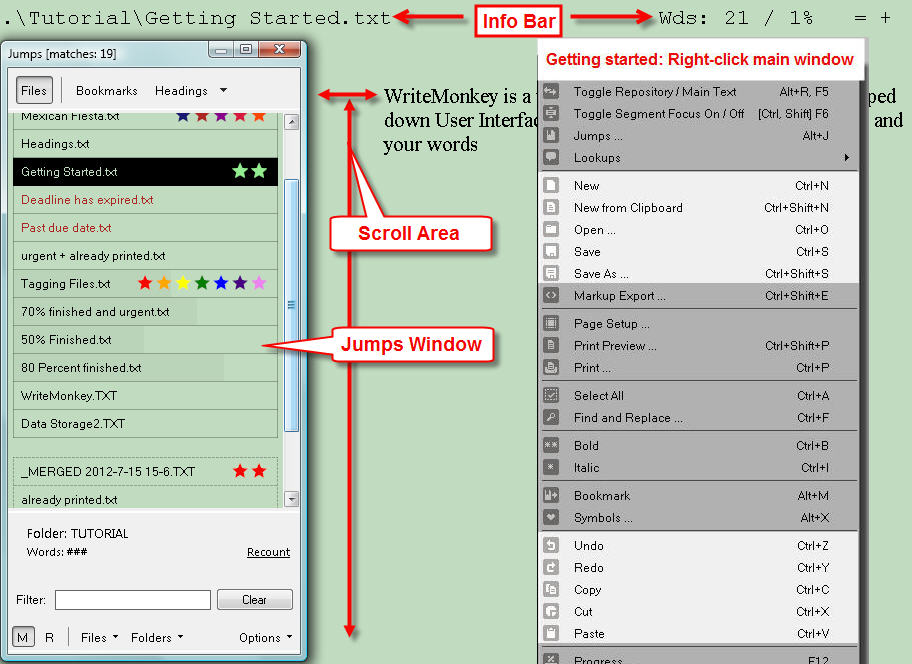
| To open a file simply drag it into Writemonkey's main window | |
| CTRL+N | New File from Scratch |
| CTRL+SHIFT+N | New File from Clipboard contents |
| Moving text | |
| Drag&Drop | a selection with the mouse, hold CTRL to copy |
| When nothing is selected, the following affects the whole paragraph: | |
| ALT+Up/Down | to move current paragraph up or down |
| CTRL+C | to copy |
| CTRL+X | to cut |
| For maximum portability your work is stored in standard text files | |
| CTRL+S | Save |
| CTRL+SHIFT+S | Save as... |
| CTRL+Q | Quit Writemonkey |
WriteMonkey version 2.4.0.6 | This helpfile last updated on Aug 29, 2012 --- Stefan Müller