Data Expressions
From Alchemex
Home > Connector > Data Expressions > Data Expressions
Data Expression
A Data Expression is a field in a Data Container chosen by the Connector to be available through the Report Manager Interface.
To display the properties of your Data Expression, select a Data Expression
and on the Toolbar click the Properties button  .
.
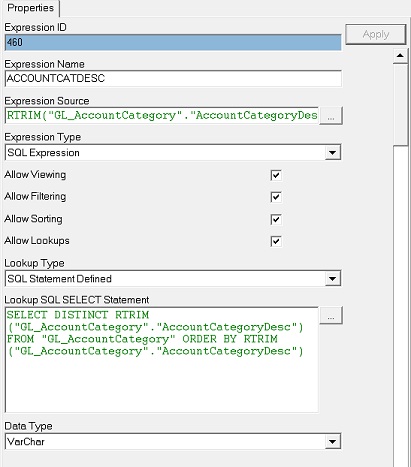
The Data Expression properties window will appear.
To Hide/Unhide advanced properties check/uncheck the Show Advanced button
 .
.
| Property | Description |
|---|---|
| Expression ID | This is a Technical Key Identifier for the Data Expression |
| Expression Name | The Name or Alias for the Data Expression |
| Expression Source | The Source Data Field Name of the underlying data for the Data Expression or a SQL Expression or an Excel Formula depending on the Expression Type (see below).. |
| Expression Type | This indicates the type of expression that is being used. By default it is set to Data Field and in this case will be referring to a single column in an underlying Data Table. It can also be set to SQL Expression to allow a raw SQL expression to be used (including the use of the ODBC drivers available Functions), or to Excel Formula. In the last case Excel formulae can be specified in the Expression source. No equal sign should be used to prefix the formulae. When Excel formulae are used here then to reference other Data Expressions in the formula use their Expression Names. E.G. CONCATENATE(Category," - ",ProductName). If the Expression names have spaces or other non Alpha-numeric characters in them then simply replace these characters with underscores in your Excel Formula |
| Allow Viewing | Allow users to Report on this Expression. This setting allows the user to add this expression as a column to a report. If switched off it does not stop reports functioning that were created before the setting was changed |
| Allow Filtering | Allow users to filter on this Expression. This setting allows the user to add this expression as a filter to a report. If switched off it does not stop reports functioning that were created before the setting was changed |
| Allow Sorting | Allow users to perform sorting using this Expression. This setting allows the user to add this expression as a sort field to a report. If switched off it does not stop reports functioning that were created before the setting was changed |
| Allow Lookups | Allow users to perform lookups on this Expression which will make Parameter Lookup Lists available for this Expression. This option should only be used on Data Expressions which are expected to have a fairly limited set of distinct values. Using Lookups against large diverse data sets can vastly hinder system performance |
| Lookup Type | Sets where the Parameter Lookup List dataset is pulled from. See Defining Parameter Lookups for further information. |
| Data Type | The underlying data type for the Expression. If you change an Expression to be of Expression Type SQL Expression then you should pick the correct Data type that the Expression is expected to return |