Viewing Selected Objects in a Drawing
From AutoCAD AutoLISP & Visual LISP
Viewing Blocks in the Drawing Database

Viewing AutoCAD Drawing Entities

Viewing Extended Data

Choose
View  Browse Drawing Database Browse Selection
from the VLISP menu to select the drawing objects you want to view.
VLISP invokes the ssget function to prompt
you to define a selection set in the AutoCAD drawing window.
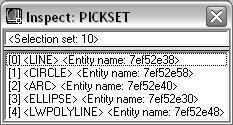
When you complete the selection, VLISP opens the Inspect window
for your selection:
Browse Drawing Database Browse Selection
from the VLISP menu to select the drawing objects you want to view.
VLISP invokes the ssget function to prompt
you to define a selection set in the AutoCAD drawing window.
When you complete the selection, VLISP opens the Inspect window
for your selection:
Double-click on an entity name to open an Inspect window for the entity, or select an entity, right-click, and choose Inspect.