View Status of Tills
From Amicus


| Amicus | |
| View Status of Tills | |
| Submit feedback on this topic | |
| Key Areas > Sales > Common Tasks > Supervisor Tasks > Till Actions > View Status of Tills |
Glossary Item Box
To review any till at any site is a simple operation. To do so, click Sales on the Toolbar followed by Till Actions then View Status of Tills or by clicking the View Status of Tills button at the bottom of the Balance Till screen. If the balance till screen is already open, a message box will appear asking the user if they want to show this new record.
The filters on the View Status of Tills screen are site, till and date range. The till and site will default to the current till and site. The screen can be used to view opened tills, closed tills, balanced tills and running balances. Selecting check boxes will determine which ones should be shown in the list. Each checkbox has respective icon, to indicate its purpose in the list. The only checkbox to be selected be default is the balanced tills checkbox.
Select the required site, till and date range then select the requisite Show check boxes and then select the Refresh button. A table listing the selected tills will be displayed as shown below.
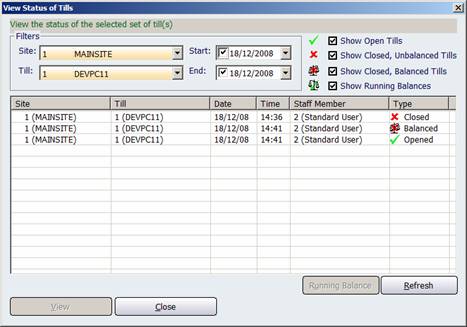
Figure : The status of the selected set of tills
The table has the following columns; Site, Till, Date and Time, Staff Member and the tills status Type;
-
Opened Till – The text “Opened” will be displayed along with the icon
 .
. -
Closed Till – The text “Closed” will be displayed along with the icon
 .
. -
Balanced Till – The text “Balanced” will be displayed along with the icon
 .
. -
Running Balance – The text “Running” will be displayed along with the icon
 .
.
View – Clicking this button will display the Balance Till screen for the selected till, alternatively double clicking on a list item will be the same as selecting the item. If the balance till screen is already open, a message box will appear asking the user if they want to show this new record.
Refresh – Each time the filters are changed the refresh button will need to be selected to refresh the list.
Running Balance – If a till in the list is opened or closed, then a running balance can be performed.