Sales By Sub-Department Report
From Amicus


| Amicus | |
| Sales By Sub-Department Report | |
| See Also Submit feedback on this topic | |
| Reports > Sales Reports > Sales By Sub-Department Report |
Glossary Item Box
Similar to the Sales By Department Report, the Sales By Sub-Department Report will list the totals of items sold within a department grouping items by sub-department.
Click Reports on the Main Menu, followed by Sales Reports then Sales By Sub-Department Report option. Alternatively, click Sales on the Toolbar followed by Reports, Sales Reports then Sales By Sub-Department Report option.

Figure : Sales By Sub-Department Report options
Options
Select the Start Date Time, End Date Time, Site and Department.
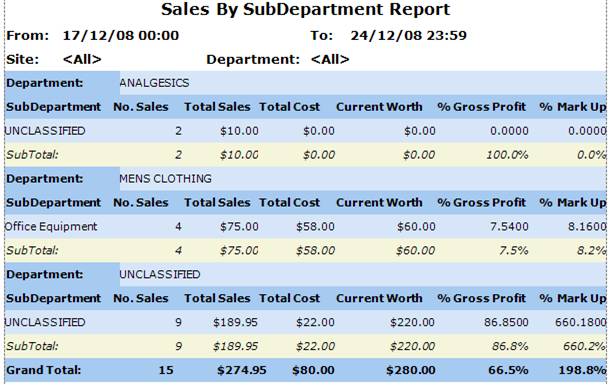
Figure : Sales By Sub-Department Report sample report
Filters
The filters listed on the report include; Start Date Time, End Date Time, Site and Department.
Details
The sales are grouped by Department then are listed by Sub-Department, No. Sales, Total Sales, Total Cost, Current Worth of the sales made, % Gross Profit and % mark Up on products in the sub-department.