Sales By Staff Report
From Amicus


| Amicus | |
| Sales By Staff Report | |
| See Also Submit feedback on this topic | |
| Reports > Sales Reports > Sales By Staff Report |
Glossary Item Box
The Sales By Staff Report summarises the amount of sales made by a team member on a member by member basis.
Click Reports on the Main Menu, followed by Sales Reports then Sales By Staff Report option. Alternatively, click Sales on the Toolbar followed by Reports, Sales Reports then Sales By Staff Report option.
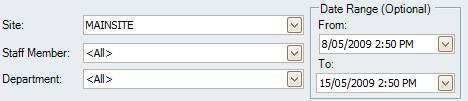
Figure : Sales By Staff Report options
Options
Select the Date Range, Site, Staff Member and Department.
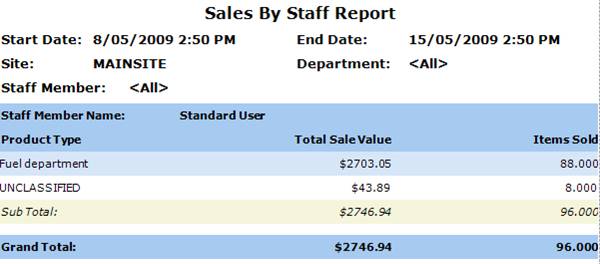
Figure : Sales By Staff Report sample report
Filters
The filters selected are displayed as Start Date, End Date, Site and Staff Member.
Details
Each staff members sales are grouped under the Staff Member Name and are listed as Product Type, Total Sale Value, Items Sold and Sub-Total / Grand Total of sales and totals value of sales made by the team member.