Sales Person Sales Statistics Report
From Amicus


| Amicus | |
| Sales Person Sales Statistics Report | |
| See Also Submit feedback on this topic | |
| Reports > Sales Reports > Sales Person Sales Statistics Report |
Glossary Item Box
This report gives a detailed lists of a team members sales statistics, in addition the report includes graphical representations comparing a team members sales record against either gross sales or gross profit.
Click Reports on the Main Menu, followed by Sales Reports then Sales Person Sales Statistics Report option. Alternatively, click Sales on the Toolbar followed by Reports, Sales Reports then Sales Person Sales Statistics Report option.

Figure : Sales Person Sales Statistics Report options
Options
Select the Start Date Time, End Date Time, Staff then select how to Calculate Mark Up / Gross Profit By, either cost or worth.

Figure : Sales Person Sales Statistics Report sample report - Filters & Table of Figures
Filters
The filters selected will be displayed on the report as date From / To and For Sales Person.
Details
The sales statistics are listed by; Code, Sales Person, Number Of Sales, number of Items Sold, Average No. Of Items Per Sale, Gross Profit Average, Gross Sale Average, and the total Gross Profit and Gross Sales.
Graph
In addition to the table of figures the report includes graphical comparisons of Gross Sales & Gross Profit between team members.
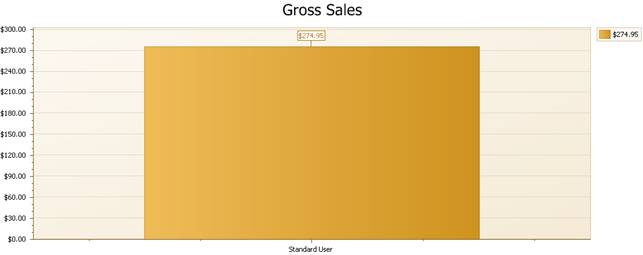
Figure : Sales Person Sales Statistics Report sample report - Gross Sales graph
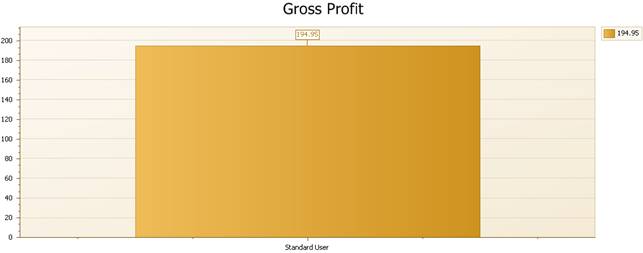
Figure : Sales Person Sales Statistics Report sample report - Gross Profit graph