Sales By Customer By Department Report
From Amicus


| Amicus | |
| Sales By Customer By Department Report | |
| See Also Submit feedback on this topic | |
| Reports > Sales Reports > Sales By Customer By Department Report |
Glossary Item Box
This report summarises totals of sales within departments per customer, i.e. Joe Smiths purchases within Men’s Shoes and the Electrical Goods departments.
Click Reports on the Main Menu, followed by Sales Reports then Sales By Customer By Department Report option. Alternatively, click Sales on the Toolbar followed by Reports, Sales Reports then Sales By Customer By Department Report option.

Figure : Sales By Customer By Department Report options
Options
Select the Start Date Time, End Date Time, Site and Till. Also check Exclude Cash Customer to include/exclude the Cash customer in the report.
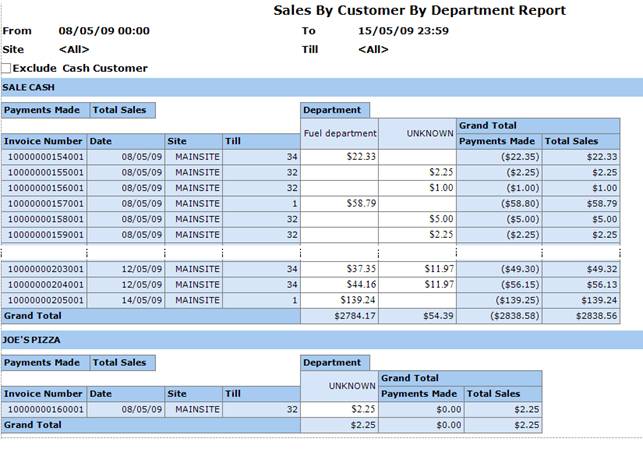
Figure : Sales By Customer By Department Report sample report
Filters
The report displays selected filters as date From / To and Site.
Details
The sales to customer are grouped by Customer Name and are listed by Invoice Number, Date, Site, Till, sales per Department and Grand Total of sales made in all departments & all sales made.