Sales By Customer Report
From Amicus


| Amicus | |
| Sales By Customer Report | |
| See Also Submit feedback on this topic | |
| Reports > Sales Reports > Sales By Customer Report |
Glossary Item Box
The Sales By Customer Report lists total of items only sold to customers on a customer by customer basis. The report also gives a graphical comparison of customers to total value of the customers purchases and number of sales per customer.
Click Reports on the Main Menu, followed by Sales Reports then Sales By Customer Report option. Alternatively, click Sales on the Toolbar followed by Reports, Sales Reports then Sales By Customer Report option.

Figure : Sales By Customer Report options
Options
Select the Start Date Time, End Date Time, Site and if the report should generate a Summary Only or a full report.
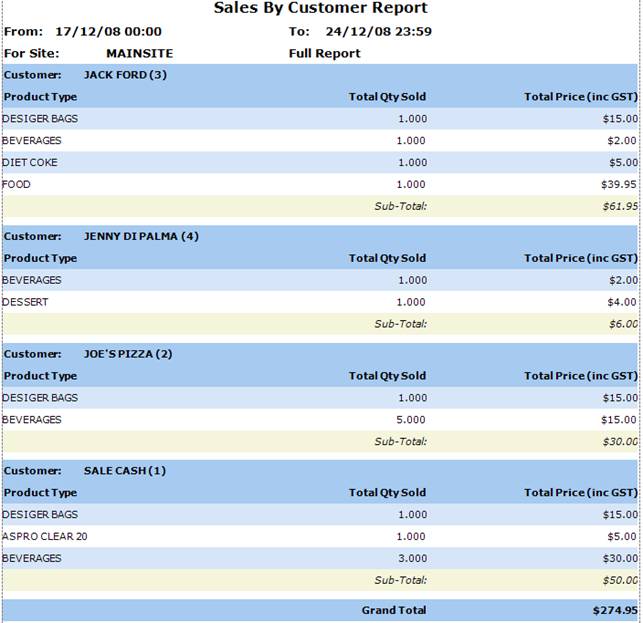
Figure : Sales By Customer Report sample report - filters & table of figures
Filters
The filters selected are listed on the report as date From / To, For Site and Report Type refers to either the summary or full report being generated.
Details
The sales made to customers are grouped by Customer name and ID then are listed by Product Type, Total Qty Sold, and Total Price (inc GST).
Graphs
In addition to the figures listed above, the value and number of sales towards customers is displayed in a bar chart. The Value of Sales graph displays a comparison between each customer and how much each customer has spent in the period. The Number of Sales graph displays a comparison between each customer and how many item s each customer has purchased.
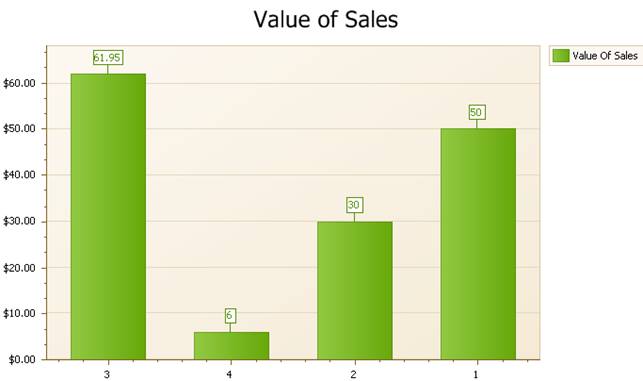
Figure : Sales By Customer Report sample report - Value of Sales graph
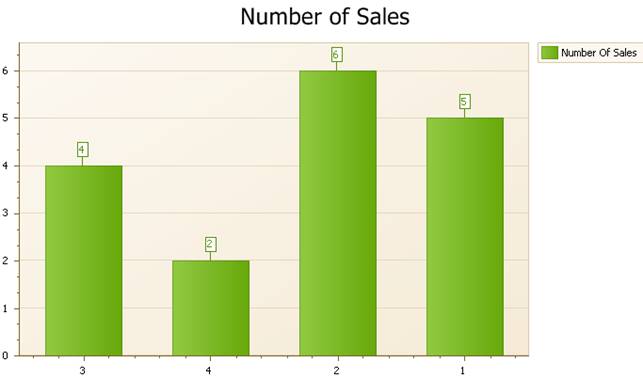
Figure : Sales By Customer Report sample report - Number of Sales graph