Sales Audit Trail Report
From Amicus


| Amicus | |
| Sales Audit Trail Report | |
| See Also Submit feedback on this topic | |
| Reports > Sales Reports > Sales Audit Trail Report |
Glossary Item Box
The Sales Audit Trail Report lists all the transactions performed by a team member on a Site by Site basis, including initialising the sale & inputting the associated payments, reversals, etc.
Click Reports on the Main Menu, followed by Sales Reports then Sales Audit Trail Report option. Alternatively, click Sales on the Toolbar followed by Reports, Sales Reports then Sales Audit Trail Report option.

Figure : Sales Audit Trail Report options
Options
Select the Start Date Time, End Date Time and Site.
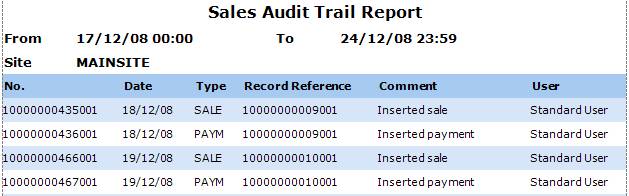
Figure : Sales Audit Trail Report sample report
Filters
The selected filters are listed on the report as dates From/To and Site
Details
Sales are listed on the report as No., Site, sales Type, Record Reference, Comment and User.