Product Verification Report
From Amicus


| Amicus | |
| Product Verification Report | |
| See Also Submit feedback on this topic | |
| Reports > Product Reports > Product Verification Report |
Glossary Item Box
The Product Verification Report lists the current pricing, supplier & location of individual products, including value of an items worth, the current stock quantity, mark-up per (as a percentage) and Gross Profit on individual items.
Click Reports on the Main Menu, followed by Product Reports then Product Verification Report option. Alternatively, click Products on the Toolbar followed by Reports, Product Reports then Product Verification Report option.
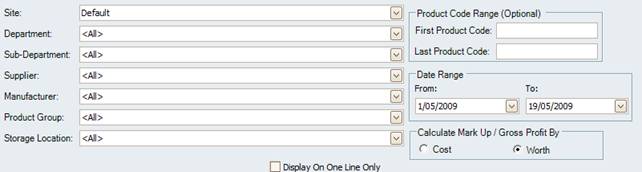
Figure :Product Verification Report options
Options
Select the Date Range, Site, Department, Sub-Department, Supplier, Manufacturer, Storage Location, Product Group, Staff Member, Product Code Range and select how the Mark Up and Profit columns are calculated by, either Cost or Worth. The results can also be export fiendly by checking Display On One line Only.
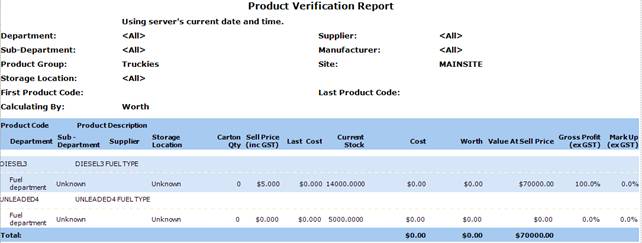
Figure : Product Verification Report sample report
Filters
The generated report lists the selected filters including; Site, Department, Sub-Department, Supplier, Manufacturer, Storage Location, Product Group, Staff Member and First / Last Product Code.
Details
The products details listed include; Product Code / Product Description, Department, Sub-Department, Supplier, Storage Location, Carton Qty, Sell Price (inc GST), Last Cost, Current Stock level, Cost, Worth, Value At Sell Price, Mark Up (inc GST), Gross Profit (inc GST) and the Total Cost, Worth & Value At Sell Price for all items listed.