Product Transaction History Report
From Amicus


| Amicus | |
| Product Transaction History Report | |
| See Also Submit feedback on this topic | |
| Reports > Product Reports > Product Transaction History Report |
Glossary Item Box
The product transaction History Report lists all the products that have been sold within a period including which transaction contained the product.
Click Reports on the Main Menu, followed by Product Reports then Product Transaction History Report option. Alternatively, click Products on the Toolbar followed by Reports, Product Reports then Product Transaction History Report option.
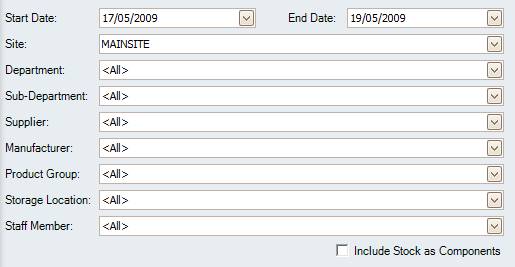
Figure : Product Transaction History Report options
Options
Select Start Date, End date, Site, Department, Sub-Department, Supplier, Manufacturer, Storage Location, Product Group, Staff Member and check
Allows the stock that is a component sof another to be marked in the report.
',event)">Include Stock as Component that is component of another product.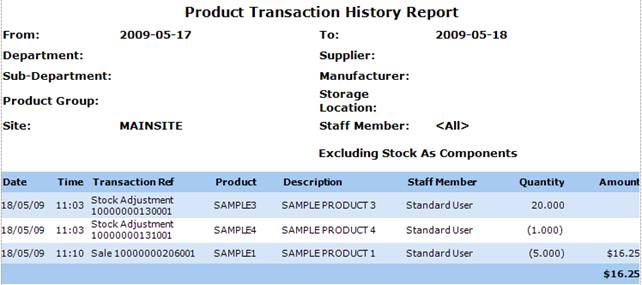
Figure : Product Transaction History Report sample report
Filters
The generated report will list the filters used including; date From$$To:End Date Time$$, Site, Department, Sub-Department, Supplier, Manufacturer, Storage Location, Product Group and Staff Member.
Details
The transactions are listed by; Date/Time, Transaction Ref, Product Code, Description, Quantity and the Amount of the total value of all the products in the transaction.
Note: If the transaction is a sale or a loss then the amounts column will display a value. If the transaction is a transfer, then the amount will not display the value as you haven’t gained anything.