Product Turnover Report
From Amicus


| Amicus | |
| Product Turnover Report | |
| See Also Submit feedback on this topic | |
| Reports > Product Reports > Product Turnover Report |
Glossary Item Box
This report lists stock turnover for the current financial year on a month by month basis.
Click Reports on the Main Menu, followed by Product Reports then Product Turnover Report option. Alternatively, click Products on the Toolbar followed by Reports, Product Reports then Product Turnover Report option.
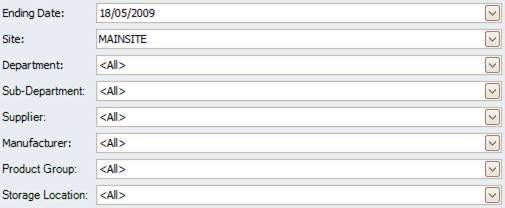
Figure : Product Turnover Report options
Options
Select the Ending Date up to when the product turnover occurred, the Site, Department, Sub-Department, Supplier, Manufacturer, Storage Location, Product Group.
.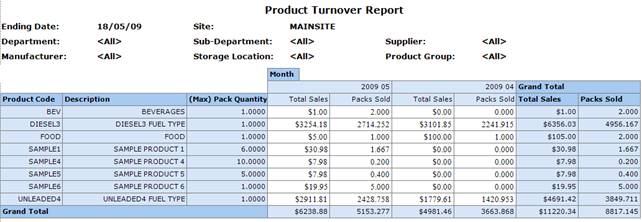
Figure : Product Turnover Report sample report
Filters
The report will list the filters used including; Ending Date, Site, Department, Sub-Department, Supplier, Manufacturer, Storage Location, Product Group.
Details
The products listed include Product Code, Description and (Max) Pack Quantity. The Total Sales and number of Packs Sold are grouped by Month.