Product Stock Level Summary Report
From Amicus


| Amicus | |
| Product Stock Level Summary Report | |
| See Also Submit feedback on this topic | |
| Reports > Product Reports > Product Stock Level Summary Report |
Glossary Item Box
This report will list the details of quantity, cost and worth for individual products levels, transactions, adjustments, purchases and sales.
Click Reports on the Main Menu, followed by Product Reports then Product Stock Level Summary Report option. Alternatively, click Products on the Toolbar followed by Reports, Product Reports then Product Stock Level Summary Report option.
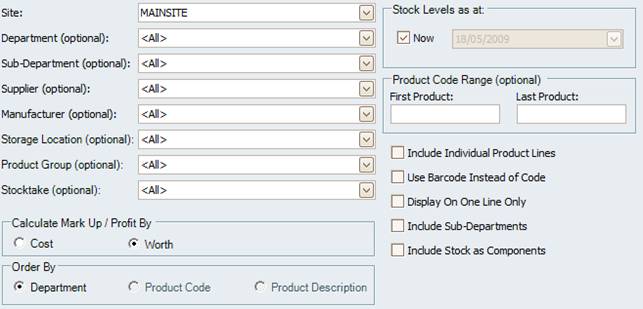
Figure : Product Stock Level Summary Report options
Options
To select the Stock Levels as at x date, Check the box Now to search for products on the current date & time, or uncheck to specify a specific date.
NOTE: Please keep checked unless absolutely necessary as the process will revert back to the closest stocktake to the date asked and calculate all transactions on each product requested
Select the Site, Department (Optional), Supplier (Optional), Sub-Department (Optional), Manufacturer (Optional), Product Group (Optional), Storage Location (Optional), Stocktake (Optional) and Product Code Range (Optional).
In addition the mark up & profit columns can be calculated by either Cost or Worth. To arrange results Order By either Department, Product Code or Product Description, to group results select Include Sub-Departments, Include Stock as Components. Include Individual Product Lines will separate products from department groupings.
You can also select to Use Barcode Instead of Code and you can also display results on one line by checking Display On One line Only.
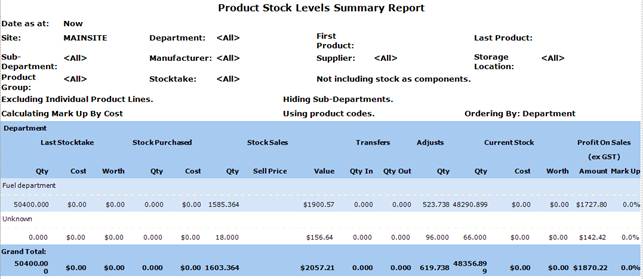
Figure : Product Stock Level Summary Report sample report
Filters
The report will list the filters used including; Site, Department, Sub-Department, Supplier, Manufacturer, Storage Location, Product Group, Stocktake and First / Last Product.
Details
The results are listed by Department/Sub-Department and include the Qty, Value and Worth of the Last stocktake, the Qty and Cost of Stock Purchased since last stocktake, The Qty, no of Sales and Value of Stock Sales since last stocktake, the number of Transfers in/ out, the number of Adjustments, the Current Stock Qty, Cost and Worth and the Profit On Sales by Amount and Mark Up.