Product Stock Sales Report
From Amicus


| Amicus | |
| Product Stock Sales Report | |
| See Also Submit feedback on this topic | |
| Reports > Product Reports > Product Stock Sales Report |
Glossary Item Box
The Product Stock Sales Report lists products by sales. This report gives details of stock purchased against the sale of those items in turn giving profit after Tax & mark-up margins.
Click Reports on the Main Menu, followed by Product Reports then Product Stock Sales Report option. Alternatively, click Products on the Toolbar followed by Reports, Product Reports then Product Stock Sales Report option.
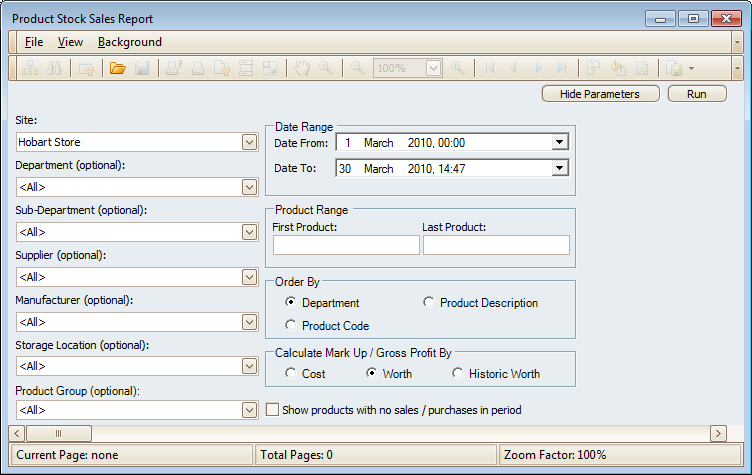 Figure : Product Stock Sales Report options
Options
Select the Site, Department (Optional), Supplier (Optional), Sub-Department (Optional), Manufacturer (Optional), Product Group (Optional), Storage Location (Optional), Stocktake (Optional), Product Code Range and Date Range.
In addition Markup and Profit columns can be calculated by Cost, Worth or Historic Worth. To arrange results Order By either Department, Product Code or Product Description. Check Show products with no sales/purchases in the period to add them to the report.
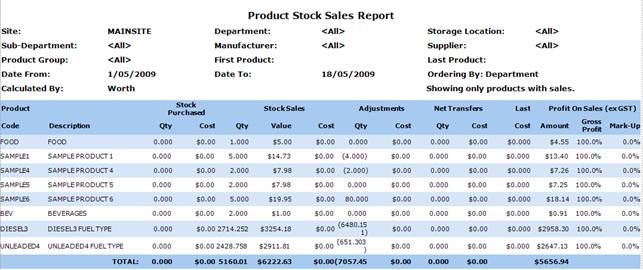
Figure : Product Stock Sales Report sample report
Filters
The report will list the filters used including; Site, Department, Sub-Department, Supplier, Manufacturer, Storage Location, Product Group, Stocktake and First / Last Product.
Details
The results are listed by Product Code/Description, Stock Purchased Qty/
Cost is the price of the item when recieved from the supplier and input a stock receipt in to amicus.
i.e. you recieve x items for $3 and input a stock reciept for that amount. The cost at sale is $3 per item.
',event)">Cost, Stock Sales Qty/Value/Cost, Adjustments Qty/Cost, Last Cost, Profit on Sales (ex GST) Amount/ Gross Profit and Mark-Up.