Product Details Report
From Amicus


| Amicus | |
| Product Details Report | |
| See Also Submit feedback on this topic | |
| Reports > Product Reports > Product Details Report |
Glossary Item Box
The Product Details Report gives a detailed about a products information as stored in the database. The report includes an items code, description, contents per carton, groups the item is located under, size, colour, number of order items, etc.
Click Reports on the Main Menu, followed by Product Reports then Product Details Report option. Alternatively, click Products on the Toolbar followed by Reports, Product Reports then Product Details Report option.
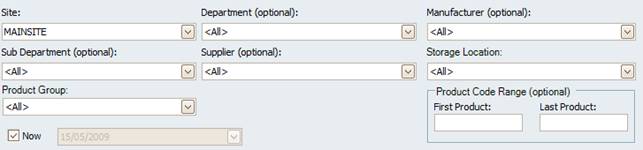
Figure : Product Details Report options
Options
The results can be filtered by; Site, Department (optional), Manufacturer (optional), Sub-Department (optional), Supplier (optional), Storage Location, Product Group, Product Code range (optional) and a records date time the date Now.
NOTE: Please keep checked unless absolutely necessary as the process will revert back to the closest stocktake to the date asked and subtract all interactions on each product requested.
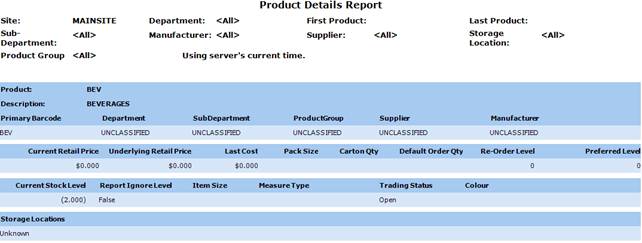
Figure : Product Details Report sample report
Filters
The report will list the selected filters including; Site, Department, Manufacturer, Sub-Department, Supplier, Storage Location, Product Group, Product Code range
Details
The report lists product information including; Product code, Primary Barcode, Description, Department, Sub-Department, Product Group, Supplier, Manufacturer, Current Retail Price, Underlying Retail Price, Last Cost, Pack Size, Carton Qty, Default Order Qty, Re-Order Level, Preferred Level, Current Stock Level.
The report also displays if the Reports Ignore Level of stock, the Item Size Measure Type, the Trading Status and the products Colour.