Period Sales Summary Report
From Amicus


| Amicus | |
| Period Sales Summary Report | |
| See Also Submit feedback on this topic | |
| Reports > Sales Reports > Period Sales Summary Report |
Glossary Item Box
The Period Sales Summary Report will give a set of summaries for Sales, Payments, Cash in/out, Stock purchased along with other transaction totals.
Click Reports on the Main Menu, followed by Sales Reports then Period Sales Summary Report option. Alternatively, click Sales on the Toolbar followed by Reports, Sales Reports then Period Sales Summary Report option.

Figure : Period Sales Summary Report options
Options
Select the Site and Report Period and interval when the sales occurred. i.e. summary of sales made between 12 Dec & 7 Jan on a daily basis.

Figure : Period Sales Summary Report sample report - filters
Filters
The report will list the filters selected as date From / To, Site and Detail Level of the selected period intervals.
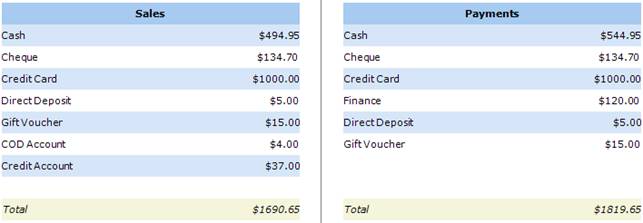
Figure : Period Sales Summary Report sample report - Sales / Payments
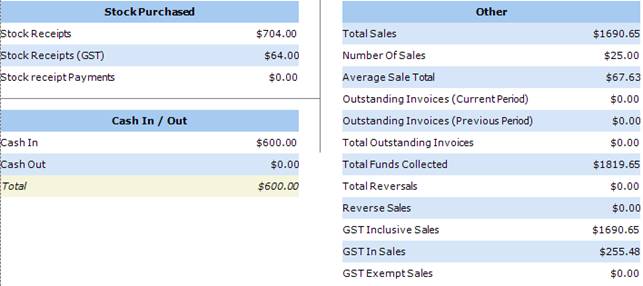
Figure :Period Sales Summary Report sample report - Stock Purchased / Cash In Out / Other
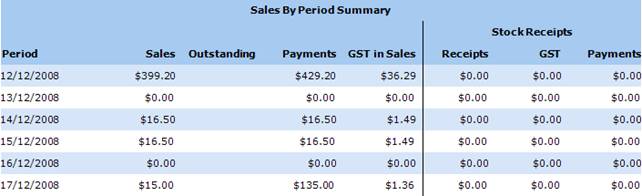
Figure : Period Sales Summary Report sample report - Sales By Period Summary
Details
Each type of sales statistics are grouped as;
Sales - Displays sub-totals of the sales types along with a Sales total.
Payments - Displays sub-totals of the payment types along with a Payments total.
Stock Purchased - Displays sub-totals of Stock Purchased.
Cash In / Cash Out - Displays sub-totals and total of cash transactions.
Other - Displays sub-totals of other minor sales details.
Sales By Period Summary - Displays a summary of sales in each interval within the period.
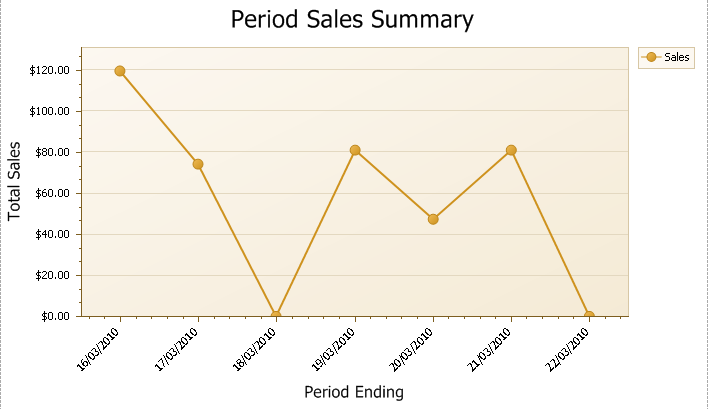
Figure :Period Sales Summary Report sample report - Line Graph of Sales
At the end of the Period Sales Summary Report there is a line graph that gives you a visual representation of the sales that have been made in the reporting period.