Customer Contact List
From Amicus


| Amicus | |
| Customer Contact List | |
| See Also Submit feedback on this topic | |
| Reports > Customer Reports > Customer Contact List |
Glossary Item Box
This report will list all the contact details for customers stored in the database.
Click Reports on the Main Menu, followed by Customer Reports then Customer Contact List option. Alternatively, click Customers on the Toolbar followed by Reports, Customer Reports then Customer Contact List option.

Figure : Customer Contact List options
Options
Select a Starting Letter(Optional) and Select Search Text allow the results to be filtered by a Starting character or Containing a word. If lift blank these filters will return all Customer contact details.
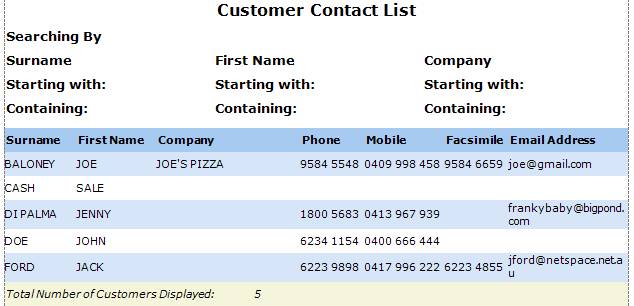
Figure : Customer Contact List sample report – displays all contacts with filters blank
Filters
Searching By displays the search criteria used, name and/or company initials and/or whole words.
Details
The results list customers by Surname, First Name, Company, Phone, Mobile, Facsimile and Email Address.