Additional Product Codes
From Amicus


| Amicus | |
| Additional Product Codes | |
| Submit feedback on this topic | |
| Key Areas > Stock Control And Products > Product Maintenance > Additional Product Codes |
Glossary Item Box
The Additional Product Codes tab allows for the allocation of more than one bar code per product where the product is the same as the standard, but is available in multiples as packs, pallets, etc.
The Additional Product Codes tab comprises the following elements:
-
Barcode table: Displays all barcodes for the product and associated information.
-
Add, Edit and Delete controls: Enables management of listed barcodes.
-
Product Record controls: These controls allow navigation through all NBS Amicus records.
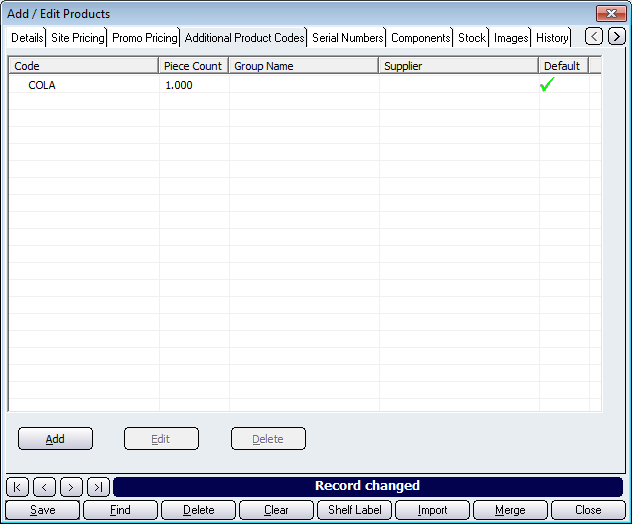
Figure : Additional Product Codes tab
Barcode Screen
The table lists pack barcodes for the product. Columns include; Code, Supplier Piece Count, Group Name.
Default: Displays which product is the default. The default code is used if there is one barcode linked to more than one pack.
Other buttons on the Edit Barcode screen include, Save, and Close.
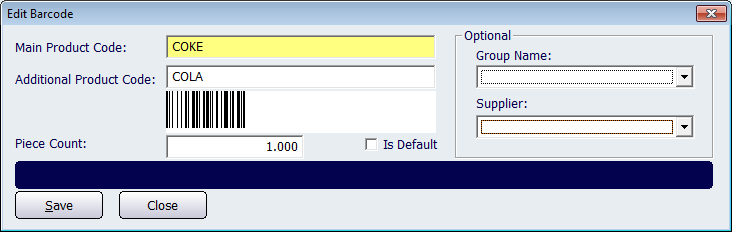
Figure : Edit Barcode dialog
Buttons that perform actions on the Additional Product Codes tab include, < and >, allow you to respectively scroll forwards and backwards through the items on the screen one record at a time. To quickly find the first or last items record, click either the |< or >| key respectively. These buttons appear at the bottom of all Add/Edit dialog tabs providing access to all products, customers, suppliers, etc. ',event)">Navigational Arrows, Save, Find, Delete, Clear, Shelf Label, Import, Merge, and Close.