Stored Procedures
From Alchemex 7.1
Home > Connector > Data Containers > Stored Procedures
Stored Procedures
Sage Intelligence Reporting supports the use of Stored Procedures as the source for Data Containers for certain Database systems. For a list of the supported systems please go to Stored Procedure Supported Databases.
Adding a Stored Procedure Container - Step by Step
- In the Connector, add a new container to your connection. When prompted to Select the Container Type select Stored Procedure.
- Enter a descriptive name for the Container.
When prompted to Specify the Stored Procedure details enter the name of the Stored Procedure and any Input Arguments for the stored Procedure. In the example below the Stored Procedure is called sp_sales_by_region and it expects a integer argument for the Year and a string argument for the Continent.
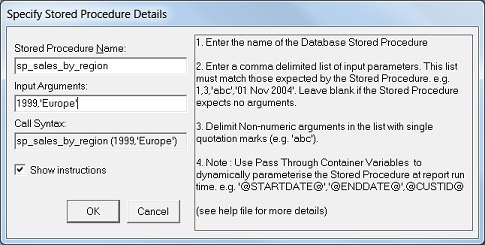
- Click OK to complete adding the Container.
- Right-click on the new container and select Add Expressions. When prompted for the Expression Type to add, select Data Fields.
- The list of fields that the Stored Procedure returns will appear. Select those fields which you would like to be available for reporting on, and click OK. The Container is now ready to be used in reports.
Dynamically Setting Stored Procedures Input Arguments at Report Run Time - Step by Step:
To dynamically parameterize reports that use a Stored Procedure that expects input arguments the Container must be used in conjunction with Pass Through Variable(s). The defined Pass Through Variables must in turn be defined as Parameters on the report.
- Add Pass Through Variable(s) to the Container.
- Add Parameters to the report based on the Container Pass Through Variable Expressions create in Step 1.
- Edit the Source Container property of the Container to include
the Pass Through Variable defined codes in the stored procedure input
argument list. For the example above the syntax would be:
@YEAR@, @CONTINENT@
where @YEAR@ and @CONTINENT@ are the Expression Source (or Variable Code) property values of defined Pass Through Variables within the Container. Note: When a stored procedure expects non numeric (for example, text based inputs) then the Variable code must be prefixed and suffixed with a single quotation mark (').
Limitations of Using Stored Procedures as Containers
The following limitations exist when using Stored Procedures as Data Containers:
- Only Expression Fields of types Data Field and Pass Through Variable can be used in the Container. SQL Expression and Excel Formula type expressions are not supported
- Reports that use Stored Procedure type containers cannot use Filters or Aggregate Filters. Filtering can only be achieved with a combination of Report Parameters, Pass Through Variables and Stored Procedure Input Arguments
- Stored Procedure must return a single data set only
- Only a single Stored Procedure can be used in a Container. Stored Procedures cannot be joined