Using Pass Through Variables in Data Expressions
From Alchemex 7.1
Home > Connector > Data Expressions > Using Pass Through Variables in Data Expressions
Pass Through Variables
Pass Through Variables enable the queries (or SQL statements) that are sent to the Database Systems during report execution to be affected at run time. Where ordinary Parameters are used to modify the filtering element (or WHERE clause) of a query only Pass Through Variables can be used with Parameters to modify other parts of the query. Pass Through Variables must be used in conjunction with a reports Parameters to be effective.
Pass Through Variables are an advanced report writing facility and require a strong understanding of the Sage Intelligence Reporting Connector Functions and of basic database query concepts. Pass Through Variables are a special type of Container Expression and are defined within containers in the Sage Intelligence Reporting Connector.
Pass Through Variables can also be effectively used to pass common Parameter Values through a series of Union Child Reports within a Union Report. In this way a Union Report may be configured to use one pop up Parameter screen to paramaterise a number of Union Child Reports.
Terminology
- Pass Through Variable A special type of Container Expression used to hold a variable value that can be used within a report
- Pass Through Variable Code The Expression Source property defined as a unique code prefixed and suffixed with @ symbols. This code can be used in Report Filters, Report Aggregate Filters and in other Expression Source properties. Where literal values are usually placed in filter comparison values the Pass Through Variable Code may be substituted
- Pass Through Variable Value The value held within a Pass Through Variable during the execution of a Report. Note that the value can only be set through a Report Parameter based on the Pass Through Variable. Note that the lifetime of the Pass Through Variable Value is from when the value is set during report parameterization to when the report execution completes
What can Pass Through Variables be used for?
Pass Through Variables can thus be used to achieve the following:
- Dynamically modify the outcome of a Report Column through Display Fields that are based on Expressions which include Variables
- To filter data in a report
- Parameterize multiple Union Child Reports in a Report through a single Parameter selection
- Parameterize multiple Reports in a report batch through a single Parameter selection
- Apply multiple Filters that use a single Parameter which is based on a Pass Through Variable
- Create Aggregate Parameters by using Aggregate Filters with Pass Through Variable based Parameters
- Set Stored Procedure input arguments.
To define a Pass Through Variable - Step by Step
- Add an expression to a container
- When prompted for the type of expression choose "Pass Through Variable"
- You will be prompted for a descriptive name for the Variable. Enter a name for example, Company Name
You will then be prompted for a Code for the Pass Through Variable. The code is a unique identifier for the Pass Through Variable. The code must be prefixed and suffixed with @ symbols. for example, @COMPANY@. This code that you choose for the Pass Through Variable has no relation to any existing Expressions in the Container. The Code must however be unique within the Container and should preferably be unique within your Sage Intelligence Reporting System to prevent conflicts when using Pass Through Variables in Union Reports
Note: having done this you may then use the code @COMPANY@ in any of the containers Expressions or any Report Filters to dynamically effect queries at report run time
- To set the Pass Through Variable Value you must define a Parameter on a report that uses the Pass Through Variable. Add a Parameter to a report in the usual way but specifying the defined Pass Through Variable as the expression to use for the Report. When you run the report you will be prompted for a Parameter which will then set the Pass Through Variable Value and any occurrences of the variable within the underlying queries will be replaced with variable value
To Use a Pass Through Variable Within Another Container Expression
Modify the Source Property of the Expression to include the Pass Through Variable Code. See the example below where a SQL Expression has included a Pass through Variable Code:
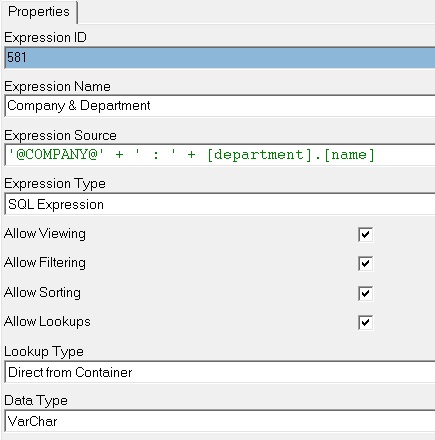
- Add a Parameter to your report and choose the Pass Through Parameter Expression as the source.
- Run your report and enter a value for the Parameter "Company". The value that you enter for the parameter will be placed into the variable @COMPANY@ and substituted into the expression "Company & Department".
To Use a Pass Through Variable to Filter Data in a Report
- Make sure that the Container that is used in your report has Pass Through Variable(s) defined as explained above.
- Add a Parameter to your report based on the Pass Through Variable. Note that running the report and entering a value for the Pass Through Variable will have no effect on the report output until the Pass Through Variable Code has been added to a filter (or aggregate filter) as in step 3.
- Add a filter to the report that you wish to based on an Expression that must be filtered in conjunction with the Pass Through Variable Code. Choose the relevant Comparison Method for the filter (for example, Is Equal To) and then enter the code for the pass through variable (for example, @COMPANY@).
- Run the Report. The Parameter prompt will be used to set the Pass Through Variable value. This value will be substituted for the Pass Through Variable code (@COMPANY@) in the Filter set in step 3 and will thus effect the output of the report Query (through the SQL WHERE clause).
To Use a Pass Through Variable to Filter Aggregated Data in a Report
Follow the steps as outlined in "To use a Pass Through Variable to Filter Data in a Report" but in step 3 use an Aggregate Filter instead of a standard Filter.
To Use a Pass Through Variable Within Multiple Union Sub Reports
When a Union Report runs the individual Union Sub Report queries are executed and the data placed into a single Microsoft Excel Workbook. Although the underlying queries are executed independently and possibly against different Databases the Pass Through Variables that are populated become available for the remaining scope of the Union Report execution. This means that a Pass Through Variable defined in a container for the first Union Sub Report is set as the first Union Sub Report is executed. The Variable can then be reused in the subsequent Union Sub Reports. This can be useful to avoid multiple Parameter popup boxes where the Union Sub Reports require similar parameterisations. An example is described below:
The first Union Sub Report needs to pull Ledger Balances for the Account ACC001 and the second Union Sub Report needs to pull Transactions for the same account. The first Report is based on the Container "General Ledger" and the second report is based on the Container "Ledger Transactions". To create a Union Report that achieves this but with a single parameter screen you could do the following:
- Define a Pass Through Variable called Account with code @ACCOUNTNUM@ in the container "General Ledger".
- Create a Union Report that uses the pre-created reports "Ledger" (based on General Ledger container) and "Transactions" (based on "Ledger Transactions" Container).
- On the report "General Ledger" add a Parameter based on the Pass Trough Variable Account created in step 1.
- On the report "General Ledger" add a Filter based on the Container Field AccNum with Comparison Method "Is Equal To" and with Comparison Value as @ACCOUNTNUM@.
- On the report "Transactions" add a Filter based on the Container Field AccNum with Comparison Method "Is Equal To" and with Comparison Value as @ACCOUNTNUM@.
Note: Make sure that the order of the Union Sub Reports is "Transactions" first and then "General Ledger".
The reason for this is that Union Reports use a LIFO (Last In First Out) technique with Sub Reports and thus the "General Ledger" Sub Report will execute first and the Pass Through Variable will be set upfront and thus also be available to the report "Transactions".