Exporting Reports with Protection
From Alchemex 7.1
Home >
Exporting Reports with Protection
If you are running a Solution Developer License of Sage Intelligence Reporting, then it is possible to protect your packaged export files for re-distribution. This allows you to protect your intellectual property from others while still allowing you to distribute and deliver your reports to other Sage Intelligence Reporting installations.
Protection happens at the Container and Container Expression level. Containers can be protected with a number of options. The Export Options screen for the Solution Developer is shown below. This screen only appears if you are the creator of the container (Container Owned by) used in a report that is being exported.
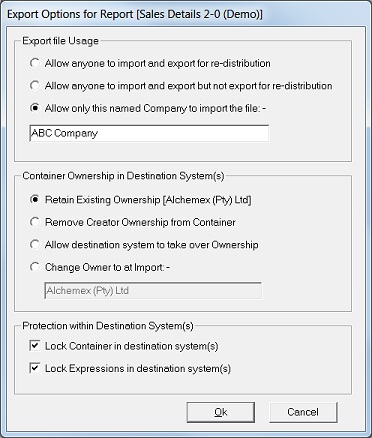
The export protection options are explained below.
Export File Usage Options
The concept of Container Usage exists so that report writers can restrict who can import their reports.
See the options available for Usage below:
- Allow anyone to import and export for re-distribution - Selecting this option will allow the export file to be imported by anyone. Use this option when you are not concerned about the file being shared.
- Allow anyone to import and export but not export for re-distribution - This option will create an export file that can be imported by any company. On import though the container created will be stamped for usage just by the company that is importing it. Any reports connected to the container that are later exported by the company can only be re-imported by that same company. This option is best suited for export files that will be made available on the Community.
- Allow only this named Company to import the file - This option provides the most secure way to re-distribute your reports however it does require that you export a report every time you need to send it to a company.
Container Ownership in Destination System Options
The concept of Container Ownership exists so that report writers can protect their intellectual property, most commonly for re-sale of reusable reports. The Company which has Ownership should not be confused with the Company that is licensed for Usage. Only under special circumstances should you change Ownership of your Containers.
See the options below for Ownership:
- Retain Existing Ownership - This is the default option and should be left as this to keep ownership of your Container intellectual property in all Sage Intelligence Reporting systems which receive your reports.
- Remove Creator Ownership from Container - Use this option when do not wish the created Container in destination systems to have an owner.
- Allow Destination System to take over Ownership - Use this option only when you wish to transfer the ownership of your intellectual property to the receiving company. Note that all companies that receive the export file will assume ownership of the container on import.
- Change Owner to Named Company at Import - This option allows you to explicitly name the Company that will assume Container Ownership at import. This option should be used when you wish to transfer ownership of your Container intellectual property to a named company.
Protection within Destination System Options
Sage Intelligence Reporting allows the intellectual property that exists in Containers to be protected. Protected containers can be used in destination systems but the details of the Container are not accessible. Where a large amount of IP is contained in a container (for example, complex SQL Joins and SQL Expressions) then these details can be hidden by using these protection options.The protection options available are:
- Lock Container in destination system(s) - This will hide the Source properties of the Container in the destination system and not allow it to be edited. Only protecting at this level will mean that Expressions can still be added, edited and deleted.
- Lock Expressions in destination system(s) - This will hide all the properties of all the Expressions in the Container in the destination system. Expressions cannot be added, edited or deleted in the Container when this option is selected.
For maximum protection of your Container IP select both of these options on export.
Note that it is possible to perform an unlock of a Container and its Expressions in a system with the assistance and authorisation of the Container Owner. See the topic Unlocking a Container and its Expressions for more details.