Unlocking a Container and Expressions
From Alchemex 7.1
Home >
Unlocking a Container and Expressions
If a Container and/or its Expressions have been locked using Sage Intelligence Reporting's intellectual property (IP) protection facilities then it can be unlocked by the Owner of the Container if necessary. There are two scenarios that could occur.
The owner of the Container needs to Unlock in their system
In this scenario, where the Container Owner (see the Property "Container Owned by" of the Container) is the same as the Sage Intelligence Reporting registered Company in the License Manager, then the Unlock operation is simple. Right-click on the Container and select Unlock Container or Unlock Container Expressions to perform the required Unlock operation. The unlock will occur without any authorisation required.
A Company licensed for usage of the Container but not the Container Owner needs to Unlock in their system
In this scenario the unlock operation needs to authorised by the Owner of the Container. Note that once this is done the IP will no longer be hidden from the user of the container.
The Owner of the Company will need to supply Pin Codes to the Usage Company to perform the unlock. These Pin Codes are unique to the Container and the Usage Company and cannot be re-used by other companies to perform an unlock. One Pin Code is required for unlocking the Container and one is required for unlocking a Containers Expressions.
For the Container Owner to generate these Pin Codes:
- Select the Container, right-click and choose Generate Unlock Pin Codes.
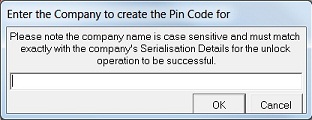
- The screen shown below will display.
Enter the Usage Company that you wish to supply the Pin Codes to. (Note that the Company name must be identical to the Company Name in the License Manager of the destination system.) This name is Case Sensitive.
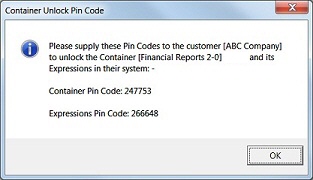
Press OK and you will receive a Pin Code message as shown below. Note the Pin Codes and supply these to the destination company (ABC Company in this example).
- ABC Company should select the Container in their Sage Intelligence Reporting system.
- Right-click and select Unlock Container or Unlock Container Expressions.
- A prompt will appear for each unlock operation requiring the supplied Unlock Pin Code. On entering a valid Pin Code the unlock operation will occur.