Working with PR# files
From Alchemex 7.1
Home >
Working with PR# files
A .PR# extension denotes a file created using Sage Intelligence Reporting software . Note: # denotes a designated number.
A PR# file allows a report to be run from a shortcut without needing to use the Report Manager Interface. To use PR# files they need to be created using the Report Manager Interface and then associated with the Sage Intelligence Reporting execution program under the windows operating system.
Creating a PR1 file
To create a
.PR1 file select a report in the Object Window and click on the Create .PR# icon .
You will be prompted to select a location and name for the
new .PR# file.
Associating a PR# file with Sage Intelligence Reporting
When
you double click on the .PR#
file you
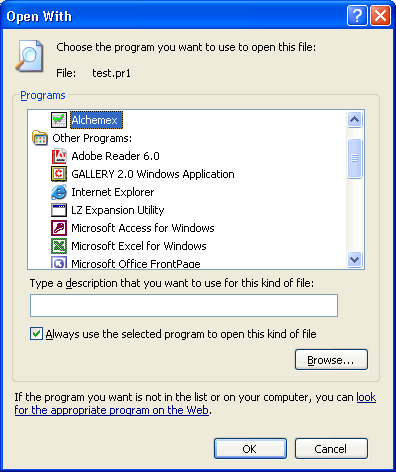
have created, Windows will prompt you
to choose a file to "Open With...".
Browse to theSage Intelligence Reporting
program
and choose OK.
The report associated with the .PR1 file
will be launched.
If you want to permanently associate
.PR#
files with Sage Intelligence Reporting
then check the option Always use this
program to open these files and click on OK.