| Microsoft XML Core Services (MSXML) 5.0 for Microsoft Office - SAX2 Developer's Guide |  |
Application Form (Simple Filter)
To get started, create a new project and then reference Microsoft XML Core Services (MSXML) 5.0 for Microsoft Office.
To create a new project
- Open Microsoft® Visual Basic® 6.0, and in the New Project dialog box, double-click Standard EXE.
To create a reference to MSXML 5.0
- On the Project menu, click References.
- In the Available References list, select Microsoft XML,v5.0, and then click OK.
Add Controls to the Form
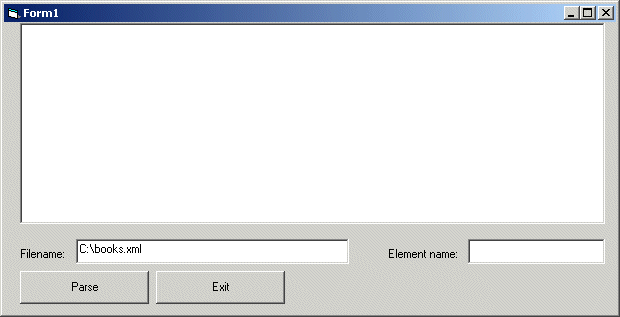
Now you must build the user interface for the simple filter application. Add the following controls to the form.
- A text box, Text1, with the Multiline property set to True. This text box should be large enough to display the results of the parse process.
- A text box, Text2, with "books.xml", the name of the file that the application parses and converts, specified as the Text property.
- A text box, Text3. This text box is used to specify the element name that serves as the filter criteria.
- A command button, Command1, with the caption "Parse". This button starts the parse process.
- A command button, Command2, with the caption "Exit". This button closes the application.
The form should look like the following.
Add Code to the Form
The code for the form:
- Creates instances of
MXXMLWriterandSAXAttributesobjects. - Creates an instance of the
SAXXMLReader. - Creates an instance of the
ContentHandlerImplclass implementing theIVBSAXContentHandlerandIVBSAXErrorHandlerinterfaces. - Sets the
errorHandlerand thecontentHandlerproperties for theSAXXMLReaderto point to theContentHandlerImplclass. - Sets the instance of
MXXMLWriterto variables in theContentHandlerImplclass that hold references to theIVBSAXContentHandlerandIVBSAXErrorHandlerinterfaces. This enables theMXXMLWriterobject to receiveContentHandlerandErrorHandlerevents. - Calls the
SetFilterCriteriamethod in theContentHandlerImplclass and sets the filter criteria. - Starts the parsing operation.
Complete Code for the Form
'Create a writer and an attribute helper.
Public oWriter As New MXXMLWriter50
Public atrs As New SAXAttributes50

Private Sub Command1_Click()
'Create the reader.
Dim rdr As New SAXXMLReader50
'Create the content handler.
Dim cnth As New ContentHandlerImpl
'Set the content handler for the reader.
Set rdr.contentHandler = cnth
'Set the error handler for the reader.
Set rdr.errorHandler = cnth
'Set the writer for the content handler.
Set cnth.oContentHandler = oWriter
'Set the error handler for the writer.
Set cnth.oErrorHandler = oWriter

'Configure output for the writer.
oWriter.indent = True
oWriter.standalone = True
oWriter.output = ""
oWriter.omitXMLDeclaration = True

'Set the filter criteria in the content handler.
cnth.SetFilterCriteria (Text3.Text)

On Error GoTo HandleError

'Parse the document.
rdr.parseURL (Text2.Text)

Text1.Text = oWriter.output

Exit Sub

HandleError:
    If Not cnth.errorHappen Then
        Text1.Text = "**** Error **** " & Err.Number & " : " & Err.Description
    End If
End Sub
Private Sub Command2_Click()
    Unload Me
End Sub
See Also
How Filter Criteria is Set | IMXWriter Interface | MXXMLWriter CoClass | ISAXContentHandler Interface | ISAXErrorHandler Interface