Set
Set — Configure a resource from a data interface
Script Syntax
Setdestinationsource(options)
Description
The Set command retrieves data from
source according to
options and populates
destination. Time systems, time
formats, state types, and coordinate systems are automatically converted
to those required by
destination.
See Also: FileInterface, Spacecraft
Options
| Option | Description | ||||||||||
|---|---|---|---|---|---|---|---|---|---|---|---|
destination
|
The resource to populate from the data source.
|
||||||||||
source
|
The data source from which to obtain data.
|
||||||||||
options
|
Options specific to the chosen
|
The following options are available when
source is a
FileInterface and the Format is
“TVHF_ASCII”:
-
Data={keyword[,keyword, ...]} -
Comma-separated list of values to retrieve from the file. Defaults to
'All', which retrieves all available elements. The available keywords are documented in the “TVHF_ASCII” section of the FileInterface reference.
GUI
|
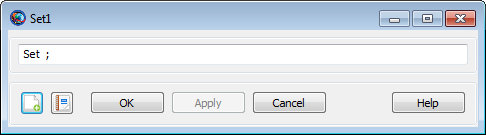
The Set GUI is a very simple text box that lets you type the command directly. By default, it has no arguments, so you must finish the command yourself.
Examples
Read a TVHF file and use it to configure a spacecraft.
          Create Spacecraft aSat
Create FileInterface tvhf
tvhf.Filename = 'statevec.txt'
tvhf.Format = 'TVHF_ASCII'

BeginMissionSequence

Set aSat tvhf
Read a TVHF file and use it to set only the epoch and the Cartesian state.
          Create Spacecraft aSat
Create FileInterface tvhf
tvhf.Filename = 'statevec.txt'
tvhf.Format = 'TVHF_ASCII'

BeginMissionSequence

Set aSat tvhf (Data = {'Epoch', 'CartesianState'})