HTML Help Tips
From SecureCRT
 How
to Use this Help
How
to Use this Help
This topic provides some tips on customizing the font size and printing help topics using HTML Help.
The font size used when viewing this documentation is directly related to the font size and settings used by Internet Explorer. This help documentation is designed to display content at a preset font size. However, you can override the font size by modifying the settings in Internet Explorer.
To customize the font size in Internet Explorer 4.0 and 5.0 (where Internet Explorer 4.0 instructions differ from 5.0, 4.0 items are shown in parenthesis):
· Open the Tools (View) menu and select internet Options.
· Click on the Accessibility button.
· Click on the Ignore font sizes on Web pages option.
· Click OK twice to return to the main Internet Explorer window.
· Open the View menu and select Text Size (Fonts) and choose from among the available font sizes.
With HTML Help, an entire top-level book can be printed at once, allowing you to print the entire documentation with a few print commands. To print all of the topics contained in a book, right-click on the book you wish to print and select Print from the pop-up menu. Select the Print the selected heading and all subtopics option (see dialog below) and click on the OK button.
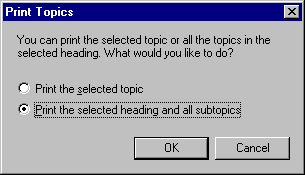
You also have the option of printing a single topic by selecting the appropriate option in the Print Topics dialog (above).